One of the goals of the Oracle Mobile Cloud Service (MCS) is to be client agnostic. So, you should be able to connect to your MCS hosted mobile backend from any client technology out there.
If you are a JavaScript developer you might be familiar with the very popular Ionic Framework.
Now, if you want to use an Ionic-based mobile app with the Oracle Mobile Cloud Service backend we have created a starter project for you that will show you how to perform the basic tasks and get you going in no time.
Have a look or clone the following GIT repo: https://github.com/mjabali/ionic-starter-mcs
The Readme file provides the instructions on how to get started with this sample.
Have fun!
Showing posts with label android. Show all posts
Showing posts with label android. Show all posts
Wednesday, November 4, 2015
Wednesday, February 4, 2015
Redirecting the log file in the Oracle Mobile Application Framework
If you have been developing with the Oracle Mobile Application Framework you already know that's not always easy to get debugging information out of the iOS Simulator or the Android Emulator.
When you are running on the iOS Simulator you can now use the -consoleRedirect option and send the logging information to an easier location to find. Although you can do that in Apple's XCode, doing that in JDeveloper is quite straightforward.
Open up your MAF project in JDeveloper, select Run >>> Choose Active Run Configuration >>> Manage Run Configurations

Then, click Edit and select the Mobile Run Configuration
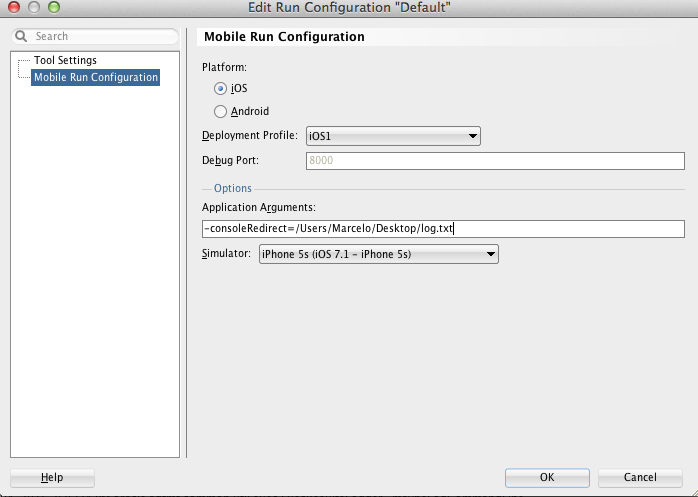
Add the -consoleRedirect=<Any_File_You_Want> and select the Simulator configuration (if you have multiple ones configured). Click OK.
You can now use the JDeveloper Run button (the little green triangle on the top menu) that will launch and run your app (you must use this approach to redirect the log file - that's a limitation but worth the price).
This has been tested with the Oracle Mobile Application Framework 2.1.
Happy Debugging!
When you are running on the iOS Simulator you can now use the -consoleRedirect option and send the logging information to an easier location to find. Although you can do that in Apple's XCode, doing that in JDeveloper is quite straightforward.
Open up your MAF project in JDeveloper, select Run >>> Choose Active Run Configuration >>> Manage Run Configurations
Then, click Edit and select the Mobile Run Configuration
Add the -consoleRedirect=<Any_File_You_Want> and select the Simulator configuration (if you have multiple ones configured). Click OK.
You can now use the JDeveloper Run button (the little green triangle on the top menu) that will launch and run your app (you must use this approach to redirect the log file - that's a limitation but worth the price).
This has been tested with the Oracle Mobile Application Framework 2.1.
Happy Debugging!

Friday, December 28, 2012
Removing Click Delays on Mobile Browsers
If you ever wanted to get rid of the 300ms delay between a physical tap and the the firing of a click event introduced on mobile browsers then the polyfill those guys from Financial Times created is the answer you are looking for.
Available on GitHub, FastClick is a simple, easy-to-use library for eliminating that delay and make your application feel more responsive to, for example, the touch of a button.
Have a look and fork the project at: https://github.com/ftlabs/fastclick
You can also give it a try running one of the demos on your mobile device pointing your browser to: http://ftlabs.github.com/fastclick/examples/layer.html (it won't work on your desktop browser as the library doesn't attach any listeners to them).
Fascinating and job well done...
Available on GitHub, FastClick is a simple, easy-to-use library for eliminating that delay and make your application feel more responsive to, for example, the touch of a button.
Have a look and fork the project at: https://github.com/ftlabs/fastclick
You can also give it a try running one of the demos on your mobile device pointing your browser to: http://ftlabs.github.com/fastclick/examples/layer.html (it won't work on your desktop browser as the library doesn't attach any listeners to them).
Fascinating and job well done...
Subscribe to:
Posts (Atom)
Setting Up Local Environment for Developing Oracle Intelligent Bots Custom Components
Oh the joy of having a local development environment is priceless. For most cloud based solutions the story repeats itself being hard to tr...
-
 There are some use cases and business scenarios where you have to process messages in order. Basically, when multiple consumers receive mes...
 -
 Apache ActiveMQ / FUSE Message Broker has a feature called Virtual Destinations that are logical destinations (queues or topics) mapped t...
 -
 For several times I wondered what was the exact time my machine booted, woke up or slept. So, I did a little investigation to find out tha...