Showing posts with label mobile application development. Show all posts

Wednesday, October 21, 2015

Developing against Oracle Mobile Cloud Service (MCS) with Oracle Enterprise Pack for Eclipse (OEPE) and the Mobile Application Framework (MAF)

If you want to get started developing against the Oracle Mobile Cloud Service (MCS) using the Oracle Enterprise Pack for Eclipse (OEPE) and the Mobile Application Framework (MAF) here is a quick demonstration for you to get a feel and see how quick you can get things done.

In the following 5 min. demonstration you'll see how to setup a new MAF application, connect to the Oracle Cloud from Eclipse, search for the mobile backend you're interested on, import the API definition to your app, generate the required data controls, populate a new page with data and deploy to the Android emulator.

Have fun!


Monday, October 12, 2015

Getting Started with Oracle Enterprise Pack for Eclipse and Mobile Cloud Service APIs

There is a recent uploaded Oracle Mobile Cloud Service (MCS) tutorial that walks you through the process of connecting Oracle Enterprise Pack for Eclipse (OEPE) to the MCS APIs.

There are 6 steps involved on this tutorial and you will:
  • Start Eclipse and configure it to work with Oracle Mobile Application Framework (MAF)
  • Create a new mobile application, a new feature and a page to hold data
  • Connect the MAF-based application to an MCS instance
  • Generate the Java classes to support the exposed MCS REST API
  • Develop a new page by adding data and security settings
  • Package, deploy and test the application

Enjoy!


Monday, June 22, 2015

Oracle Mobile Cloud Services - Mobile Application Accelerator (MAX) Demo

To satisfy the many, many enterprise use cases for mobility we need a new way to satisfy the demand without having to involve a mobile app development project.For many, the answer lies in giving business-side workers the ability to mobilize their own business processes. To address this requirement, Oracle is announcing the preview of Mobile Application Accelerator (MAX) , a new capability in Oracle Mobile Cloud Service. MAX is a cloud-based offering that brings mobile application development capabilities to professionals with no previous software development experience. With MAX, program managers, power users, and business professionals can develop mobile applications quickly and visually through their web browser.

Here are a few highlights of the Mobile Application Accelerator (MAX):
  • Browser based development
  • No coding required
  • Easily map to business services
  • App Preview
  • Edit, Test and Publish from the web browser
Have a look on the following demo what MAX looks like:


Wednesday, February 4, 2015

Redirecting the log file in the Oracle Mobile Application Framework

If you have been developing with the Oracle Mobile Application Framework you already know that's not always easy to get debugging information out of the iOS Simulator or the Android Emulator.

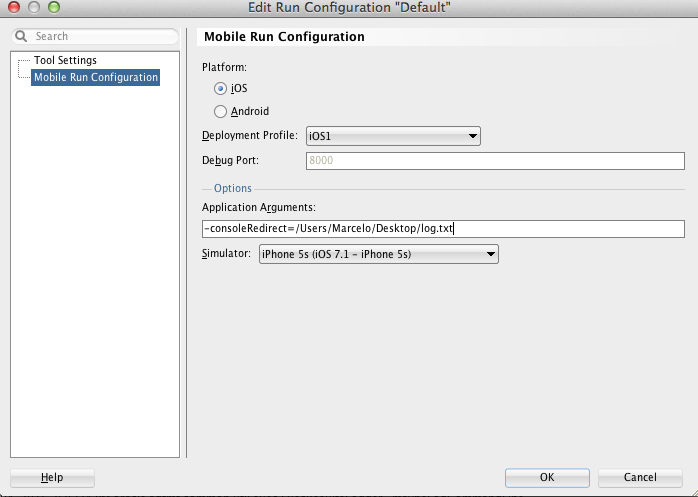
When you are running on the iOS Simulator you can now use the -consoleRedirect option and send the logging information to an easier location to find. Although you can do that in Apple's XCode, doing that in JDeveloper is quite straightforward.

Open up your MAF project in JDeveloper, select Run >>> Choose Active Run Configuration >>> Manage Run Configurations


Then, click Edit and select the Mobile Run Configuration


Add the -consoleRedirect=<Any_File_You_Want> and select the Simulator configuration (if you have multiple ones configured). Click OK.

You can now use the JDeveloper Run button (the little green triangle on the top menu) that will launch and run your app (you must use this approach to redirect the log file - that's a limitation but worth the price).

This has been tested with the Oracle Mobile Application Framework 2.1.

Happy Debugging!


Monday, January 19, 2015

Oracle Mobile Application Framework Getting Started Demo

Sometimes you just need a little push to get started on something and this is pretty much the goal of this post... to get you started with the Oracle Mobile Application Framework.

I'm a very visual person and no matter how much I read about a specific topic I prefer watching a demo or a tutorial and then I try to do something on my own.

With that idea in mind I recorded a 3-part Oracle MAF demo that covers how to get started developing a mobile app, create a new feature (module), create and customize a task flow, invoke a REST Web Service as well as a SOAP Web Service, customize the request and response for the Web Service calls, create a data control, customize the MAF AMX pages, import a local HTML resource, configure a Remote URL based feature and deploy to the iOS Simulator.

I hope you enjoy!


Part 1: Getting Started with Oracle Mobile Application Framework

Part 2: Getting Started with Oracle Mobile Application Framework

Part 3: Getting Started with Oracle Mobile Application Framework


Tuesday, December 16, 2014

How to dial a phone number from Oracle Mobile Application Framework?

Sometimes you need to dial a number from within a mobile app and for my surprise that functionality was not directly exposed through the Oracle Mobile Application Framework APIs.
Oracle MAF provides a component called Link (Go) available under the General Controls palette that can be used for navigation between pages but it can also be used to enable linking to external URLs.
Using the tel: URL scheme with the Link (Go) component gives you the capability to dial phone numbers from within an Oracle Mobile Application Framework app. 
So, here is how to do it:
On your MAF page, drag and drop a Link (Go) to the Panel Page and then set the URL in the component properties to the desired phone number. You can also use a Managed Bean to set the value if you want to do some processing before displaying the number to be called.
MAF Page source code after adding a Link (Go) component

Link (Go) component property panel

If you have mixed UI content on your Oracle MAF app and you want to get the same behavior on a HTML page you just need to add the following on your source code:
<a href="tel:+1-800-555-1234">call this number</a>
The sample code is also available here: https://github.com/mjabali/PhoneSample 

Wednesday, October 22, 2014

New Oracle Mobile Application Framework (MAF) Academy Course

If you want to get into mobile application development with Oracle Mobile Application Framework (MAF), there is a new Oracle Developer Academy course available for you.

This new course includes an introduction to the Mobile Application Framework and teaches you how to design a MAF-based application, integrate with device capabilities, how to develop with web services and how to secure a MAF application.

In this FREE two-hour interactive online course you'll learn and master the design, architecture, interoperability and security of Oracle Mobile Application Framework based applications.

Hurry up and get yourself educated on the Oracle mobile application development framework.

Here is the link to the course: http://bit.ly/MAFCourse

Have fun!

Setting Up Local Environment for Developing Oracle Intelligent Bots Custom Components

Oh the joy of having a local development environment is priceless. For most cloud based solutions the story repeats itself being hard to tr...