Showing posts with label message. Show all posts

Wednesday, August 8, 2012

An Introduction to STOMP

STOMP (Simple (or Streaming) Text-Oriented Messaging Protocol) is a simple text-oriented protocol, similar to HTTP.

STOMP provides an interoperable wire format that allows clients to communicate with almost every available message broker. STOMP is easy to implement and gives you flexibility since it is language-agnostic, meaning clients and brokers developed in different languages can send and receive messages to and from each other. 

There are lots of server implementations that support STOMP (mostly compliant with the STOMP 1.0 specification). The following is a list of STOMP 1.0 compliant message servers:


On the client side, there are many implementations for a vast number of technologies. Below, you will find the libraries available for the most popular languages.


STOMP is an alternative to other open messaging protocols such as AMQP (Advanced Message Queueing Protocol) and implementation specific wire protocols used in JMS (Java Message Service) brokers such as OpenWire. It distinguishes itself by covering a small subset of commonly used messaging operations (commands) rather than providing a comprehensive messaging API. 

Because STOMP is language-agnostic and easy to implement, it’s popular to application developers and technical architects alike. STOMP is also text-based. Since it does not use binary protocols like other message brokers, a wide range of client technologies work with STOMP, like Ruby, Python, and Perl.

STOMP is simple to implement, but supports a wide range of core enterprise messaging features, such as authentication, messaging models (point to point and publish and subscribe), message acknowledgement, transactions, message headers and properties, etc.


Tuesday, April 10, 2012

It's not lack of content...

We all have that excuse of no time for blogging or lack of interesting content for not updating our tech-y blogs but in fact there are tons of interesting things that I'm working on right now like a JDBC over WebSocket project which seems to be a really nice thing to do and also an end-to-end prototype that we at Kaazing put together for an airline company.

Basically, the airline use case goes from backend JMS-based systems to mobile devices over WebSocket using Kaazing WebSocket Gateway JMS Edition notifying the users about gate changes and flight cancellations. You gotta see this in action! It's super cool... Since it has some proprietary systems I won't be able to show you all parts but I've been working on a generic version of it where you can install all the pieces in your machine and run the whole thing locally. Ping me if you want to take a look on that.

The other project that I'm working on is the JDBC over WebSocket which basically uses Kaazing WebSocket Gateway HTML5 Edition to connect to an Apache Camel route with a Mina component and JDBC access to a MySQL database. Everything is pretty straightforward and I'll be writing a tutorial on that in the near future. But, if you need any additional info or sample code just let me know and I'll walk you thru whatever is needed to get you going...

Stay tuned!

Wednesday, November 30, 2011

Virtual and Composite Destinations with Apache ActiveMQ

Apache ActiveMQ / FUSE Message Broker has a feature called Virtual Destinations that are logical destinations (queues or topics) mapped to one or more physical destinations.

There are many benefits for using Virtual Destinations with ActiveMQ but basically you can forward messages from one JMS destination to many destinations (mixing queues and topics if you want), route messages to target destinations based on message headers (a.k.a broker-based message routing) and create highly-available load-balanced durable subscribers.


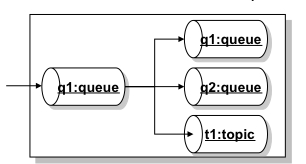
As an example, looking in the diagram above, you can have a Virtual Destination called q1, where applications will send messages to as they do to any other regular queue, and then the message will get propagated to a real physical queue called q1, to a real queue physical queue called Q2 and also to a topic called T1.

The example above is called Composite Destinations and the idea behind it is to map a Virtual Destinations to a hard-wired collection of physical destinations. From the JMS client application perspective there is nothing you'll need to change since all the configuration happens at the broker level.

So, let's look on what need to be done to work with Virtual and Composite Destinations with ActiveMQ.


The diagram above represents the idea of having producer P sending messages to a queue called CompositeQueue.q (it doesn't have to be called that way).
That queue is rooting messages to a topic called Topic.a and a queue called Queue.b.

All of the required configuration is done in the ActiveMQ XML configuration file. Below, there is snippet of the broker configuration file where the above example is configured.


<broker ...>
    <destinationInterceptors>
      <virtualDestinationInterceptor>
        <virtualDestinations>
          <compositeQueue name=“CompositeQueue.q">
            <forwardTo>
               <topic physicalName=“Topic.a" />
               <queue physicalName=“Queue.b" />
            </forwardTo>
          </compositeQueue>
        </virtualDestinations>
      </virtualDestinationInterceptor>
    </destinationInterceptors>
  </broker>

The interesting thing here is that you can mix queues and topics without making any changes in the client code and this is not part of the JMS specification.

You can also extend that to use composite topics pretty much on the same way… Below you'll find a similar broker configuration to use Virtual Topics:


<broker ...>
    <destinationInterceptors>
      <virtualDestinationInterceptor>
        <virtualDestinations>
          <compositeTopic name="VirtualTopic.A">
    <forwardTo>
           <queue physicalName="FOO" />
           <topic physicalName="BAR" />
    </forwardTo>
          </compositeTopic>
        </virtualDestinations>
      </virtualDestinationInterceptor>
    </destinationInterceptors>
  </broker>

So, with a simple change in the ActiveMQ broker configuration you can dramatically change the way
the system works and extend it to your needs without changing the client application.


Friday, November 25, 2011

Load-balanced Ordered Message Processing with Apache ActiveMQ

On my previous post (Preserving Message Order with Apache ActiveMQ) we took a look on what would be necessary to preserve message order using Apache ActiveMQ (FUSE Message Broker). We then explored on the ActiveMQ capabilities called Exclusive Consumers.

But, Exclusive Consumers bring one disadvantage that is having active consumers not doing anything (actually not consuming messages) and that may be not the desired behavior. So, let's take a look on how ActiveMQ (FUSE Message Broker) can help to avoid that situation and explore what capabilities and/or techniques are available to process messages in order when multiple consumers are active.

ActiveMQ has a feature called Message Groups which is the way to load balance multiple active consumers listening to the same queue while preserving message order. ActiveMQ will then group messages on the queue and it will guarantee that all messages of a particular group arrive in order on the same consumer.

So, to give you an example, let's say we're processing records about drivers (adding new drivers, updating drivers' information, processing speed tickets, revoking tickets, etc). You definitely don't want to process the revoke information before the ticket record because that would cause a lot of problems when the ticket doesn't exist yet and the application will try to update its information. Then, to solve that problem we could group messages by driver's license number and then let the message broker process them accordingly. Now, from the global sense the messages may not be processed in order but from the important business application sense of related messages they are delivered in the preserved order.

In the picture below, messages addressed with the same JMSXGroupID, in this case "GRP1" and "GRP2", will be pushed to a unique consumer, in other words, Consumer A will get messages that contain the JMSXGroupID equals to GRP1 and Consumer B will get messages that contain the property JMSXGroupID equals to GRP2.


In summary, ActiveMQ will correlate messages based on the property JMSXGroupsID and will deliver those to the same consumer.

On a side note, messages without a group (meaning messages with no value specified in the JMSXGroupID header property) will be distributed (load balanced) among active consumers as they would be in the normal ActiveMQ queue message processing.

But, how to implement message groups?

Very simple… the only thing you have to do is to set the JMSXGroupID property on the client producer before you send the message with whatever value you want to use for correlation. The broker itself will take care of everything else for you.

Here is a snippet of a Java client producer creating a JMS Text Message and then setting the JMSXGroupID property:

Message message = session.createTextMessage(“<foo>hey</foo>”);
message.setStringProperty(“JMSXGroupID”, “Msg_group_1”);


In the example above, all messages in the queue with JMSXGroupID set to Msg_group_1 will be directed exclusively to a single consumer.

How the messages reach the correct consumer then?

Well, the message broker maintains an internal hash map with the Group IDs and the consumers receiving messages for that specific group.

The consumer will then receive messages for that group until it drops the connection or a producer closes the message group by sending a message with a property called JMSXGroupSeq containing the value of -1 (minus one). That's going to be the flag telling the message broker that the group is no longer needed and the reference in the hash table can be removed.

For new message groups, the broker does a random selection of the active consumers and then start placing messages on that consumer.

So, to illustrate how to close a group, the following code shows the Java producer client closing the Msg_Group_1:

Message message = session.createTextMessage(“<foo>bar</foo>”);
message.setStringProperty(“JMSXGroupID”, “Msg_group_1”);
message.setIntProperty(“JMSXGroupSeq”, -1);
producer.send(message);


Then, if another message is sent to the same message group ID, the message broker will handle that as a new message group randomly assigned to a new consumer.


Thursday, November 17, 2011

Preserving Message Order with Apache ActiveMQ


There are some use cases and business scenarios where you have to process messages in order. Basically, when multiple consumers receive messages from a queue and process them in parallel, message order is not preserved.

Apache ActiveMQ has the capability to process messages in order using a feature called Exclusive Consumers. With Exclusive Consumers all messages from a single queue are processed by only one consumer (other consumers listening on the same queue will take over if the exclusive consumer fails).

So, fundamentally the diagram below shows how Exclusive Consumers work where Consumer A and Consumer B are both listening to the same queue but only the Consumer A is consuming messages from it.


The Exclusive Consumer feature is configured at the consumer level, so at the code level you have to explicitly say what queue you're listening in and also say you're an an exclusive consumer.

Here is a piece of code showing how to set the Exclusive Consumer:


queue = new ActiveMQQueue(“TEST.QUEUE?consumer.exclusive=true”);


That's very simple and still powerful…


But, there's more to that! You also have the choice to set a priority for each consumer.

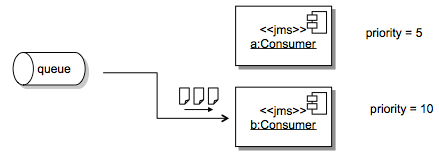
One way to ensure that high-priority applications get messages to process is to set the consumer priority. When multiple consumer request exclusive access to a queue, the consumer with the highest priority is selected by the broker.

So, another case for Exclusive Consumer priority is the machine speed you have available. You may want to give a higher priority for consumers deployed on faster machines and set the priority according to the resources you have available.

To set the Exclusive Consumer priority all you have to do is set another option on the consumer code like the below configuration:


queue = new ActiveMQQueue(“TEST.QUEUE?consumer.exclusive=true&consumer.priority=10");

The diagram below shows how the consumer priority would play with these settings.


One disadvantage of Exclusive Consumers is that you have active consumers doing nothing but we are going to cover how ActiveMQ helps you avoid that situation on a future post.

Stay tuned!


Setting Up Local Environment for Developing Oracle Intelligent Bots Custom Components

Oh the joy of having a local development environment is priceless. For most cloud based solutions the story repeats itself being hard to tr...