Showing posts with label jms. Show all posts

Monday, July 16, 2012

The Definitive Guide to HTML5 WebSocket

The book is on the way now! You can pre-order it here. It has been so much fun and a lot of work but I personally hope you can get a copy and enjoy all the content we're putting together.

Here is part of the book description if you want more information about it:

"The Definitive Guide to HTML5 WebSocket is the ultimate insider’s WebSocket resource. This revolutionary new web technology enables you to harness the power of true real-time connectivity and build responsive, modern web applications.   

This book contains everything web developers and architects need to know about WebSocket. It discusses how WebSocket-based architectures provide a dramatic reduction in unnecessary network overhead and latency compared to older HTTP (Ajax) architectures, how to layer widely used protocols such as XMPP and STOMP on top of WebSocket, and how to secure WebSocket connections and deploy WebSocket-based applications to the enterprise. Build real-time web applications with HTML5."


The book gives you an overview of HTML5 WebSocket, the WebSocket API and the protocol, the high level protocols you can use on top of WebSocket, security aspects and enterprise deployment. 


Monday, February 27, 2012

Quick Start with the Kaazing WebSocket Gateway in Less Than 6 Minutes


One of my colleagues at Kaazing just recorded a very nice tutorial on how to get started with the Kaazing WebSocket Gateway using the extreme powerful JMS Edition.
It only takes a few minutes to download, install, start up, and try out the Kaazing WebSocket Gateway. So, it's really worth it...
You can take a peek here: http://vimeo.com/36919680


Enjoy...

Wednesday, November 30, 2011

Virtual and Composite Destinations with Apache ActiveMQ

Apache ActiveMQ / FUSE Message Broker has a feature called Virtual Destinations that are logical destinations (queues or topics) mapped to one or more physical destinations.

There are many benefits for using Virtual Destinations with ActiveMQ but basically you can forward messages from one JMS destination to many destinations (mixing queues and topics if you want), route messages to target destinations based on message headers (a.k.a broker-based message routing) and create highly-available load-balanced durable subscribers.


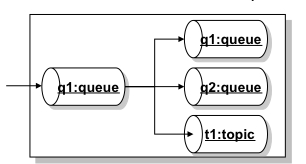
As an example, looking in the diagram above, you can have a Virtual Destination called q1, where applications will send messages to as they do to any other regular queue, and then the message will get propagated to a real physical queue called q1, to a real queue physical queue called Q2 and also to a topic called T1.

The example above is called Composite Destinations and the idea behind it is to map a Virtual Destinations to a hard-wired collection of physical destinations. From the JMS client application perspective there is nothing you'll need to change since all the configuration happens at the broker level.

So, let's look on what need to be done to work with Virtual and Composite Destinations with ActiveMQ.


The diagram above represents the idea of having producer P sending messages to a queue called CompositeQueue.q (it doesn't have to be called that way).
That queue is rooting messages to a topic called Topic.a and a queue called Queue.b.

All of the required configuration is done in the ActiveMQ XML configuration file. Below, there is snippet of the broker configuration file where the above example is configured.


<broker ...>
    <destinationInterceptors>
      <virtualDestinationInterceptor>
        <virtualDestinations>
          <compositeQueue name=“CompositeQueue.q">
            <forwardTo>
               <topic physicalName=“Topic.a" />
               <queue physicalName=“Queue.b" />
            </forwardTo>
          </compositeQueue>
        </virtualDestinations>
      </virtualDestinationInterceptor>
    </destinationInterceptors>
  </broker>

The interesting thing here is that you can mix queues and topics without making any changes in the client code and this is not part of the JMS specification.

You can also extend that to use composite topics pretty much on the same way… Below you'll find a similar broker configuration to use Virtual Topics:


<broker ...>
    <destinationInterceptors>
      <virtualDestinationInterceptor>
        <virtualDestinations>
          <compositeTopic name="VirtualTopic.A">
    <forwardTo>
           <queue physicalName="FOO" />
           <topic physicalName="BAR" />
    </forwardTo>
          </compositeTopic>
        </virtualDestinations>
      </virtualDestinationInterceptor>
    </destinationInterceptors>
  </broker>

So, with a simple change in the ActiveMQ broker configuration you can dramatically change the way
the system works and extend it to your needs without changing the client application.


Friday, November 25, 2011

Load-balanced Ordered Message Processing with Apache ActiveMQ

On my previous post (Preserving Message Order with Apache ActiveMQ) we took a look on what would be necessary to preserve message order using Apache ActiveMQ (FUSE Message Broker). We then explored on the ActiveMQ capabilities called Exclusive Consumers.

But, Exclusive Consumers bring one disadvantage that is having active consumers not doing anything (actually not consuming messages) and that may be not the desired behavior. So, let's take a look on how ActiveMQ (FUSE Message Broker) can help to avoid that situation and explore what capabilities and/or techniques are available to process messages in order when multiple consumers are active.

ActiveMQ has a feature called Message Groups which is the way to load balance multiple active consumers listening to the same queue while preserving message order. ActiveMQ will then group messages on the queue and it will guarantee that all messages of a particular group arrive in order on the same consumer.

So, to give you an example, let's say we're processing records about drivers (adding new drivers, updating drivers' information, processing speed tickets, revoking tickets, etc). You definitely don't want to process the revoke information before the ticket record because that would cause a lot of problems when the ticket doesn't exist yet and the application will try to update its information. Then, to solve that problem we could group messages by driver's license number and then let the message broker process them accordingly. Now, from the global sense the messages may not be processed in order but from the important business application sense of related messages they are delivered in the preserved order.

In the picture below, messages addressed with the same JMSXGroupID, in this case "GRP1" and "GRP2", will be pushed to a unique consumer, in other words, Consumer A will get messages that contain the JMSXGroupID equals to GRP1 and Consumer B will get messages that contain the property JMSXGroupID equals to GRP2.


In summary, ActiveMQ will correlate messages based on the property JMSXGroupsID and will deliver those to the same consumer.

On a side note, messages without a group (meaning messages with no value specified in the JMSXGroupID header property) will be distributed (load balanced) among active consumers as they would be in the normal ActiveMQ queue message processing.

But, how to implement message groups?

Very simple… the only thing you have to do is to set the JMSXGroupID property on the client producer before you send the message with whatever value you want to use for correlation. The broker itself will take care of everything else for you.

Here is a snippet of a Java client producer creating a JMS Text Message and then setting the JMSXGroupID property:

Message message = session.createTextMessage(<foo>hey</foo>);
message.setStringProperty(JMSXGroupID, Msg_group_1);


In the example above, all messages in the queue with JMSXGroupID set to Msg_group_1 will be directed exclusively to a single consumer.

How the messages reach the correct consumer then?

Well, the message broker maintains an internal hash map with the Group IDs and the consumers receiving messages for that specific group.

The consumer will then receive messages for that group until it drops the connection or a producer closes the message group by sending a message with a property called JMSXGroupSeq containing the value of -1 (minus one). That's going to be the flag telling the message broker that the group is no longer needed and the reference in the hash table can be removed.

For new message groups, the broker does a random selection of the active consumers and then start placing messages on that consumer.

So, to illustrate how to close a group, the following code shows the Java producer client closing the Msg_Group_1:

Message message = session.createTextMessage(<foo>bar</foo>);
message.setStringProperty(JMSXGroupIDMsg_group_1);
message.setIntProperty(JMSXGroupSeq-1);
producer.send(message);


Then, if another message is sent to the same message group ID, the message broker will handle that as a new message group randomly assigned to a new consumer.


Thursday, November 17, 2011

Preserving Message Order with Apache ActiveMQ


There are some use cases and business scenarios where you have to process messages in order. Basically, when multiple consumers receive messages from a queue and process them in parallel, message order is not preserved.

Apache ActiveMQ has the capability to process messages in order using a feature called Exclusive Consumers. With Exclusive Consumers all messages from a single queue are processed by only one consumer (other consumers listening on the same queue will take over if the exclusive consumer fails).

So, fundamentally the diagram below shows how Exclusive Consumers work where Consumer A and Consumer B are both listening to the same queue but only the Consumer A is consuming messages from it.


The Exclusive Consumer feature is configured at the consumer level, so at the code level you have to explicitly say what queue you're listening in and also say you're an an exclusive consumer.

Here is a piece of code showing how to set the Exclusive Consumer:


queue = new ActiveMQQueue(“TEST.QUEUE?consumer.exclusive=true”);


That's very simple and still powerful…


But, there's more to that! You also have the choice to set a priority for each consumer.

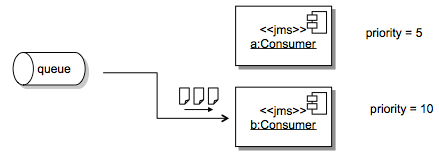
One way to ensure that high-priority applications get messages to process is to set the consumer priority. When multiple consumer request exclusive access to a queue, the consumer with the highest priority is selected by the broker.

So, another case for Exclusive Consumer priority is the machine speed you have available. You may want to give a higher priority for consumers deployed on faster machines and set the priority according to the resources you have available.

To set the Exclusive Consumer priority all you have to do is set another option on the consumer code like the below configuration:


queue = new ActiveMQQueue(“TEST.QUEUE?consumer.exclusive=true&consumer.priority=10");

The diagram below shows how the consumer priority would play with these settings.


One disadvantage of Exclusive Consumers is that you have active consumers doing nothing but we are going to cover how ActiveMQ helps you avoid that situation on a future post.

Stay tuned!


Wednesday, October 26, 2011

JMS and Database Integration with Apache ServiceMix, Camel and ActiveMQ

I've been asked to create a simple project to demonstrate how Apache ActiveMQ, Camel and ServiceMix could be used in the same integration context. Then, for the specific customer I was talking to, I decided to create something related to the world they were used to.

This example will process messages as they are delivered on an input queue and I thought that XML would be a good format to also demonstrate how to parse the payload and generate an SQL statement  before hitting the database.

In summary, for each message going to the input queue, we're going to create a record in the database table and then generate a response message on the output queue.

I'm assuming you're already have Apache ServiceMix downloaded and installed in your machine. If not, it's time to download it… I recommend you to just go to http://fusesource.com/downloads/ and download FUSE ESB.

I'm also assuming that you already have Maven installed but if not feel free to download and install it from maven.apache.org


Here are the steps to create this short and simple demonstration:


1) Download and install MySQL database from http://dev.mysql.com/downloads/
You can use the default test database that's shipped with MySQL and the only thing you have to do is to create a table to insert test records. To do that, connect to the database  and run the following SQL statement:

CREATE table PARTNER_METRIC(partner_id int, time_occurred DATE, status_code int, perf_time long);


2) Install the following features in ServiceMix:

features:install camel-jdbc
features:install camel-jms


3) Install commons-dbcp bundle:

osgi:install -s mvn:org.apache.servicemix.bundles/org.apache.servicemix.bundles.commons-dbcp/1.2.2_6


4) When you do this you will receive a bundle id, e.g. 229.  Enable dynamic imports on this bundle so that it can pick up the appropriate database driver.

dev:dynamic-import 229


5) Using ServiceMix hot deploy feature to deploy the MySQL JDBC driver:

cp /Applications/MySQL/mysql-connector-java-5.1.18/mysql-connector-java-5.1.18-bin.jar  /Users/mjabali/Fuse/apache-servicemix-4.4.1-fuse-00-08/deploy/


Then you can verify that the driver gets deployed correctly with the following command:

karaf@root> list |grep -i mysql


and you should get a message similar to the following:

[ 227] [Active     ] [            ] [       ] [   60] Sun Microsystems' JDBC Driver for MySQL (5.1.18)


6) Download the source files of this sample and extract them on the directory of your choice. So, let's review the JMS and Database connection settings  in the following resource files:

$PROJECT_HOME/src/test/resources/sample/RiderAutoPartsPartnerTest.xml
$PROJECT_HOME/src/main/resources/META-INF/spring/beans.xml file

These are the same file albeit named differently. One is used by the bundle and the other by our test case.

We'll be also using the default Apache ActiveMQ instance for the messaging aspect of this tutorial.
To check whether the ActiveMQ is installed, up and running you can run the following command:

karaf@root> osgi:list |grep activemq-broker


and you should see an output similar to this

[  66] [Active     ] [Created     ] [       ] [   50] activemq-broker.xml (0.0.0)


You can see the default broker's definition within the activemq-broker.xml file under $SERVICEMIX_HOME/etc/activemq-broker.xml

The database source definition is on the beans.xml file and you may want to adjust it to reflect the settings on your environment. Here is a copy of the definitions I have on my machine:

<bean id="myDataSource" class="org.apache.commons.dbcp.BasicDataSource" destroy-method="close">

    <property name="driverClassName" value="com.mysql.jdbc.Driver"/>

    <property name="url" value="jdbc:mysql://localhost/test"/>

    <property name="username" value="root"/>

    <property name="password" value="XXXX"/>

</bean>

7) Let's compile the code then… Run the following command on the root directory of the project

mvn clean install -Dmaven.test.skip=true


If the code builds up successfully then you're ready to deploy on ServiceMix.

8) To deploy the bundle into ServiceMix, run the following command:

karaf@root>osgi:install mvn:com.fusesource.fusebyexample/camel-jms-dbase/1.0-SNAPSHOT


A confirmation that the bundle was deployed successfully should be returned to you and a message similar to the follow one should be displayed:

Bundle ID: 228


Then, you are ready to start the bundle and verify if has started correctly. Follow the instructions below to do that:

To start the bundle:

karaf@root>osgi:start <bundle ID>


To verify the bundle has started correctly:

karaf@root>osgi:list |grep <bundle ID>


and then a message like the following should be displayed:

[ 228] [Active     ] [            ] [Started] [   60] Camel JMS Database Example (1.0.0.SNAPSHOT)


You can also immediately turn on the trace logging capability for Camel and get additional output in the ServiceMix log facility. To enable the trace logging just run:

karaf@root>set TRACE org.apache.camel


and then to see the ServiceMix log, run:

karaf@root>log:display


You should be able to see messages with the TRACE identifier similar to the below:

11:46:17,095 | TRACE | tnerRequestQueue | JmsMessageListenerContainer      | ?                                   ? | 94 - org.springframework.jms - 3.0.5.RELEASE | Consumer [ActiveMQMessageConsumer { value=ID:titan.local-54477-1319240594120-6:1:1:1, started=true }] of session [PooledSession { ActiveMQSession {id=ID:titan.local-54477-1319240594120-6:1:1,started=true} }] did not receive a message


9) To test this sample project all you have to do is to send a sample message (there is one included in the $PROJECT_HOME/src/test/resources/sample directory) to the ActiveMQ queue that the Camel route is listening for. You can use any approach you like but writing a JMS Test client is pretty simple and there are tons of examples on the Internet and also available in the ActiveMQ sample directory. You can also use tools like HermesJMS which adds a little UI for you so you don't need to create a test program.

Either way, after sending a message to the partnerRequestQueue (default queue name used on this tutorial) you should see a couple of messages in the ServiceMix console like those below:

karaf@root>  **** toSql returning: INSERT INTO PARTNER_METRIC (partner_id, time_occurred, status_code, perf_time) VALUES ('123', '200911150815', '200', '9876')

 **** fromSql returning: Sample message to be returned on reply queue


You can verify that the values were inserted into the MySQL database running a simple query like:

select * from PARTNER_METRIC;


It is also recommended to check the ServiceMix log to make sure there are no exceptions there.

The sample code for this tutorial is available on GitHub: https://github.com/mjabali/JMS-DB-Sample

I also would like to thank my colleague Susan Javurek for putting an extra effort on this and helping out with the sample code.

UPDATE: I also would like to say a big thanks to Claus Ibsen (@davsclaus) for reminding me that all the manual steps related to OSGi bundles installation could be automated using the feature capability that consists in deploy multiple related bundles into a larger unit of deployment.

Enjoy the ride...

Wednesday, October 5, 2011

Apache ActiveMQ Enhancements to JMS

The JMS (Java Message Service) specification is very well-known for those working with messaging platforms but it has been around for quite some time and honestly not getting updates lately which gives a lot of room for enhancements and extensions.

As you can imagine Apache ActiveMQ goes beyond the JMS spec and implement lots of cool things where you can gain more in functionality, performance and scalability.

Starting from the top ConnectionFactory object, ActiveMQ has its own called ActiveMQConnectionFactory, as other JMS providers also create their own specific factories, ActiveMQ enhances the JMS with some settings that you can activate right away with little configuration and definitely see gains in performance.  Of course, when you optimize for performance, most of the time, you have the trade-off of more CPU utilization but I think CPU cycles are getting really cheap when comparing with network bandwidth and disk I/O.

Here is a list of things you can use to optimize performance extending the JMS specification with Apache ActiveMQ:

disableTimeStampsByDefault - it sets whether or not you're going to include the Time Stamp in the message header. The story behind this is that when you create a JMS message (actually when you call the send() method) we have to make a call to the system kernel to get the time stamp. This setting could save you a trip to that level and save you some time optimizing performance if the time stamp is not required in your messaging application.

copyMessageOnSend - The Java Message Service specification says that inside the send method we have to make a deep copy of the message object before sending it from the client to the broker. Setting the copyMessageOnSend property to false (default is set to true) will save you a cycle as the client won't make that copy of the message saving local resources.

useCompression - I think the property name here is self explanatory... but the ActiveMQ client will compress the message payload before it goes to the broker. So, the question is why not to use compression all the time and send smaller messages over the wire? Well, in order to compress the message payload you're going to spend CPU time and then the point is CPU vs. I/O. It's a trade-off that you may have to consider... in other words, you'll have to consider spending more CPU to compress the message or more bandwidth sending larger messages. Personally, I believe (and have seem) that if you have the chance to use compression you definitely should.

objectMessageSerializationDefered - Imagine that you're sending an Object Message and you're using an embedded broker for example (client and broker running on the same JVM). What this feature really enables you to do is that you tell the client to delay the object serialization as long as it can until it needs to hit the wire or store the message on disk. Basically, everything inside the same JVM should not be serialized as marshalling and unmarshalling objects can also be expensive.

useAsyncSend - Let's say you're sending NON_PERSISTENT messages to the broker which is equal to non-blocking call with no immediate acknowledgement and in fact it's ver fast but still not reliable messaging.
On the other hand, you can also use PERSISTENT messages which is going to be a blocking call from the client to the broker. So, one of the things you can do is to set useAsyncSend to true (default is false) and then change the behavior of PERSISTENT delivery mode to be asynchronous and no acknowledgement would be expected. In reality,  the send() method will return immediately giving you more performance because it reduces the time that the message producer waits for the message to be delivered. Keep in mind that this setting can possibly cause message loss but that's another trade-off that you have to consider when designing your messaging infrastructure.
This is a good approach if you can tolerate some message loss... typically on systems where the most updated information (last message) is always what you care about or when you have a reconciliation process in place to catch those conditions.

useRetroactiveConsumer - This feature allows you to work with limited window of memory topics where you can configure a policy to deliver let's say for example the last 10 messages sent to the topic, the last 5MB of data that went through to that topic or simply the last message sent to the topic... and all of that without the need of durable subscribers :-)
This is actually far more lightweight than using durable subscribers and it's really easy to configure and very easy to use.
Finally, since this is not JMS standard, of course, it's not set by default.

For a complete list of ActiveMQ enhancements to the JMS specification see the ActiveMQ product documentation.

I hope this helps you to push the go-faster button in your messaging infrastructure.


Monday, October 3, 2011

FuseSource Tour in Brazil

I had the pleasure to spend a week in Brazil doing a FuseSource Tour in two of the major cities... Sao Paulo and Rio de Janeiro. It's pretty clear that the Open Source community is growing really fast and the integration and messaging opportunities are hot.

Unfortunately, I couldn't visit all of the prospective partners and customers that had contacted us because we couldn't find a single empty spot on the agenda but I think the tour was an amazing experience and I'm pretty I'll back in the near future for more fun with the techies.

Some of the things I realized while traveling throughout Brazil is that the traffic is really crazy and made me remember some other cities like Los Angeles or Mexico City... You have to be really creative in terms of logistics to be able to meet more than two customers in the same day especially in Sao Paulo.

Food was a big surprise and it was pretty good either in Sao Paulo or Rio and I met nice and friendly people all over the place... Gotta keep up on the workout front to shed some extra pounds!

On the business side, I've met mostly customers in the financial sector and partners that already use Apache technologies like ActiveMQ, Camel, CXF and ServiceMix and I was able to have a good tech talk with them while discussing some architectural aspects as well as development techniques.


While talking to a couple of big banks in Sao Paulo, it sounded to me that companies are realizing the value and maturity of, for example, Apache ActiveMQ where their are not only reducing licensing costs but also exploring features that other messaging products don't offer at this point.
Of course, the reliability and extensibility as well as high performance are key factors for all of these organizations and ActiveMQ is/is going to be part of their architecture.

Sao Paulo Subway System


Then, on the second part of the week (more precisely in Rio de Janeiro), I visited a telecom company who's using ServiceMix as part of their core engineering systems and I was happy to discuss patterns and features they are using and also some things they can do to improve it in the next rollout.

Rio de Janeiro's Sugar Loaf


Interesting enough, all of the developers and architects I had the pleasure to talk to were really amazed with Apache Camel and there are tons of use cases where they see possibilities of writing a couple lines using either Java DSL or Spring XML Configuration rather than several lines of code where they need to manage everything from the connection to the business logic. What everybody really liked during the Camel demos is the abstraction layer that Camel provides where you concentrate on the business logic and not on the details of the implementation. Gotta a comment that we're now "High-tech plumbers" connecting all of the enterprise applications with the simplicity and power of Camel, ActiveMQ, CXF and ServiceMix. 


But, the best moment was when I did an Apache ActiveMQ, Camel, CXF and ServiceMix overview presentation in one of the largest companies in the country for 100 developers and technical folks. I was really impressed on how excited they got after the talk and Q&A and they are really looking forward to apply the discussed topics on their projects right away. The same presentation should be the core of a webinar that I'm planning to do in December... a quick overview about the technology and how FuseSource has been helping customer/partners to successfully work with those Apache projects from conception to deployment.

To celebrate the successful talk, next morning I went for a run at Ipanema's beach where I ended up with the view below... Simply amazing...

Ipanema's Beach


Well, I'm really looking forward to continue to work with organizations in Latin America and come back soon...


Friday, May 27, 2011

An Alternative Method to the Request-Reply Pattern for Message-Driven Application Configuration

On a recent ActiveMQ forum discussion, I presented an alternative to a common problem that I've seen more and more people running into.

I've seem some companies using JMS - Java Message Service to provide application configuration based on the client profile. So, basically when the application starts, it connects to a JMS broker and then request its information. The application then receives all information necessary like settings, connections URLs, what destinations to read from and send to, etc.

That's a very smart way to dynamically provide that kind of information and be able to make changes on the fly if necessary.

You can transparently add and remove new features on the backend systems, change destinations, change server URLs, without performing any major update on the client side.

What I also have noticed is that most of the people uses the JMS request-reply mechanism to achieve that which is a good way to do it but can cause some side effects and problems during the client-broker communication once the client application will be waiting for a response from the another application through the JMS broker.

So, one alternative way to do that without the request-reply mechanism in place is employing the traditional point-to-point messaging model.

Using point-to-point messaging techniques you can load the necessary configuration message to an ordinary queue and the client applications can read the necessary information from there.

The client can instead of consume the message from the configuration queue, just browse the queue, which means that the client reads the message but doesn't remove it, so other client applications can benefit from the same configuration message as well.

You also have the ability to load multiple configuration messages to the configuration queue with different message headers where the clients could use the JMS message selector capability to get the right message.

When you need to update the configuration message you can consume that message administratively (simply connect a JMS client and consume the message would be the most simple way to do that) and then load the most updated information where the client applications can start reading from.

You can also take a different approach and create a queue for each client application profile you have but that may not be the best way to do it if you have a large installation base as it will certainly consume more resources on the broker.

Lastly, you can implement something really creative if you implement a Camel route to provide the client application configuration but I'll cover that on another post.

In summary, the idea here is to avoid the risk of the replier application not being able to respond in a timely fashion (it maybe be busy or offline) or consuming too many resources on the JMS broker with the request-reply pattern.

Tuesday, March 22, 2011

Desktop Events with OpenSpan and Oracle CEP - Part 3

Having started the Oracle CEP successfully was the goal for the second part of this tutorial. Now, we're going to start building a sample OpenSpan automation to send messages through the JMS interface we created previously and push events from the desktop application to Oracle CEP.


28. Go to OpenSpan Studio (or MS-Visual Studio with OpenSpan plug-in installed) and create a new project. Select OpenSpan Project and name it OpenSpan_OCEP_Tutorial

29. Add a new Windows Form. Add a label, text box and button to your recently created Windows Form. You should have something similar to the following picture:


30. Go to Automation1 (Add a new Automation if you don't have one) and drag a MessagePublisher component from the Toolbox (Add the component to the Toolbox if it's not available for you). Make sure it's set to Global.
31. Highlight the messagePublisher1 component and go to the Properties panel. Select the MessageVendorType and set the Message Connection Properties to connect to the Oracle WebLogic instance we configured on the Part 1 of this tutorial.


You have to provide the following information:


Host: localhost
Port: 7001
Connection Factory Name: osevents_queue_cf
Queue Name: osevents_SampleQ1
Queue Type: Queue
Username: (your username to Oracle WebLogic)
Password: (your password to Oracle WebLogic)
Session Mode: AUTO_ACKNOWLEDGE
Make sure you update the connection information to Oracle WebLogic if you haven't followed the tutorial and changed that information along the course of it.


32. Let's initialize the messageProducer1 component when we start the project. To do that, add an OpenSpan.Runtime.RuntimeHost/ProjectStarted Event component from the Toolbox.

33. Next, add the messagePublisher1 (Start Method) to the Automation1 and then connect OpenSpan.Runtime.RuntimeHost/ProjectStarted to the messagePublisher1. You should end up with something similar to the following:


34. Add the submit button click event, the text box value and messageProducer1 (Send Method) to the Automation1 canvas. Create the message workflow connecting submit button click to the message producer. Set the text of the message connecting the text box value to the msgText variable on the message producer. Your automation should look like this:


35. Run the project, type something on the text box of the Windows form and click Publish.


36. When you click Publish on the Windows form , a JMS message is dispatched from the OpenSpan Runtime to the Oracle WebLogic JMS provider, that message is stored on the osevents_SampleQ1 queue until it's consumed by the listener on the Oracle CEP project configured on Part 2 of this tutorial. The message content is then displayed on the Oracle CEP console.


37. That message is displayed on the Oracle CEP Console because the query running against the events is simply selecting all events sent to the helloInputChannel.


The HelloWorldBean then gets the text of the message's body and print it.


Feel free to modify the query running against the events published to this Oracle CEP project or the bean printing the messages to experiment different behaviors.

This concludes the Desktop Events with OpenSpan and Oracle CEP. I hope you could follow along and this tutorial could give you a good start point to work with OpenSpan and CEP engines. Please don't hesitate to contact me if you have any questions or comments.

UPDATE: The source code of this project is available at http://dl.dropbox.com/u/10511857/OCEP_OpenSpan_Tutorial.zip

Monday, March 21, 2011

Desktop Events with OpenSpan and Oracle CEP - Part 2

On the first part of this tutorial we walked through the steps of Oracle WebLogic JMS configuration. This is a very important step since it's the base underlying communication system between the major components for the integration between the applications part of this demonstration.


9. Assuming that everything works fine on the infrastructure side of the project you’re now ready to start developing your Oracle CEP application. Go to Oracle Enterprise Pack for Eclipse (Start Menu > Oracle WebLogic > Oracle Enterprise Pack for Eclipse).

10. Create a new Oracle CEP Application Project. Go to File > New > Other > Oracle CEP > Oracle CEP Application Project.

11. Name the project OpenSpan_Tutorial and leave all other fields as default.

12. Click Next.

13. On the New Oracle CEP Application Project select “Create an Oracle CEP Application using an application template” and choose Hello World as the template.

14. Click Finish.

15. At this point you should have an Oracle EPN similar to this:


16. Right-click at the OpenSpan_Tutorial canvas and select New… Adapter. Name it jmsAdapter.
17. Go to the config.xml file under the META-INF\wlevs\ directory and add the following configuration:


<jms-adapter>
<name>jmsAdapter</name>
<jndi-provider-url>t3://localhost:7001</jndi-provider-url>
<destination-jndi-name>osevents_SampleQ1</destination-jndi-name>
<user>weblogic_username</user>
<password>weblogic_password</password>
<session-transacted>false</session-transacted>
</jms-adapter>


The above configuration tells the Oracle CEP application to connect to the JMS Provider configured under Oracle WebLogic.


18. Go back to the OpenSpan Tutorial EPN and remove the connection between the helloWorldAdapter adapter and the helloworldInputChannel.

19. Add a connection from the jmsAdapter to the helloworldInputChannel.

20. Right-click on the jmsAdapter component and choose Go to Assembly Source. Add the following to the helloworld-context.xml file


<wlevs:adapter id="jmsAdapter" provider="jms-inbound">
<wlevs:listener ref="helloworldInputChannel" />
<wlevs:instance-property name="converterBean" ref="eventAdapter"/>
</wlevs:adapter>


You’ll also need to add the following bean definition:

<bean id="eventAdapter"class="com.bea.wlevs.example.helloworld.HelloWorldBean"/>


21. Go to the HelloWorldBean java class and add the following imports:


import javax.jms.JMSException;
import javax.jms.Message;
import javax.jms.TextMessage;
import com.bea.wlevs.adapters.jms.api.InboundMessageConverter;
import com.bea.wlevs.adapters.jms.api.MessageConverterException;


22. Change the HelloWorldBean class to implement InboundMessageConverter. To do that, change the class signature to be:


public class HelloWorldBean implements StreamSink, InboundMessageConverter {


23. Then, implement the following required method:


public List convert(Message message) throws MessageConverterException, JMSException {
javax.jms.TextMessage textMessage = (TextMessage) message;
System.out.println("Message Processed: " + textMessage.getText());
return null;
}


24. Save and close all files.

25. Your Oracle EPN should be similar to the following picture:


26. It’s time to deploy your project. Go to the Servers view. Right-click on your Oracle CEP v11.1 instance, click on Add and Remove, select the OpenSpan Tutorial and click on Add. Click Finish.

27. Your project should be deployed successfully and you should see a message similar to this on the Eclipse console:


<Mar 18, 2011 9:43:50 PM EDT> <Notice> <Deployment> <BEA-2045000> <The application bundle "OpenSpan_Tutorial" was deployed successfully to file:/D:/Oracle/Middleware/user_projects/domains/ocep_domain/defaultserver/applications/OpenSpan_Tutorial/OpenSpan_Tutorial.jar with version 1300499030501>
<Mar 18, 2011 9:43:51 PM EDT> <Notice> <Spring> <BEA-2047000> <The application context for "OpenSpan_Tutorial" was started successfully>

Friday, March 18, 2011

Desktop Events with OpenSpan and Oracle CEP - Part 1

Oracle’s Complex Event Processing Engine can be used to monitor large volumes of real-time data feeds but how do you enable your existing applications to trigger and react with the CEP engine?

With OpenSpan Events you can quickly and easily monitor any application or set of applications on a user’s desktop - including Windows, Web, Java, mainframe, cloud-based, virtualized or Citrix-hosted applications - without modifying the original applications. All events and associated data can be sent in real-time to Oracle CEP, as well as stored in an Oracle or other central database for analysis using OpenSpan Analytics, Oracle Hyperion or any other BI or reporting tool.

Here is a step-by-step guide to get you started with OpenSpan Events with Complex Event Processing (CEP) technology. Part 1 of this tutorial is going to cover Oracle WebLogic JMS setup.

1. Download and Install Oracle WebLogic 11g R1 (http://www.oracle.com/technetwork/middleware/weblogic/downloads/index.html)

2. Download and Install Oracle Complex Event Processing 11gR1 (http://www.oracle.com/technetwork/middleware/complex-event-processing/downloads/index.html)

3. Configure Oracle CEP plugin on Eclipse Galileo shipped with Oracle WebLogic 11g R1 (http://download.oracle.com/docs/cd/E14571_01/doc.1111/e14301/ide_intro.htm#CHDGBGGA)

4. Start your Oracle WebLogic instance (Start Menu > Programs > Oracle WebLogic > User Projects > base_domain > Start Admin Server for WebLogic Server Domain). Wait for the confirmation the server is up and running. You should see a message on the log similar to the following:

<mar 18, 2011 2:58:30 PM EDT> <notice> <weblogicserver> <BEA-000360> <server started in RUNNING mode>

5. Log in to WebLogic Server 11g Administration Console pointing your web browser to http://localhost:7001/console.

6. Click on JMS Modules under Services > Messaging. By default, Oracle WebLogic creates a JMS Module called SystemModule-0. If you don’t have it, you’ll have to create one. Click on SystemModule-0.

7. You also have to create new Queues for the sample configuration where the message exchange between the desktop applications and the Oracle CEP server is going to happen. Click on New and then select Queue. Click Next and give it a name of osevents_SampleQ1. Click Finish. Repeat the process to create another Queue called osevents_SampleQ2.
You also have to create a new connection factory object that's used to create connections for JMS clients. Name your new connection factory object osevents_queue_cf with the same JNDI name.

8. To test your recently created configuration you may want to configure a few JMS clients to send and receive messages to/from these queues. I'd recommend you taking a look on the bottom of the following resource for a pretty nice and straightforward client configuration available at http://redstack.wordpress.com/2009/12/21/a-simple-jms-client-for-weblogic-11g/.

Setting Up Local Environment for Developing Oracle Intelligent Bots Custom Components

Oh the joy of having a local development environment is priceless. For most cloud based solutions the story repeats itself being hard to tr...