Showing posts with label camel. Show all posts

Monday, April 30, 2012

Accessing Databases with HTML5 WebSockets and Apache Camel

As I have said on my previous post, I've been working with several companies with the most diverse use cases and one that really brought my attention was the requirement to access databases using HTML5 WebSockets which seems to be a clever thing to do with the right tools.

So, basically what I've setup for this is represented on the picture below:


Let's go over the implementation details of all of the components described here:

From right to left, the backend datasource I had to use was MySQL that you can download from http://www.mysql.com/downloads/. Then, I used Apache Camel as the backend framework accessing the database and also exposing a TCP-based component (Mina in this case). Moving to the left, we have the Kaazing WebSocket Gateway connecting to the Apache Camel framework and exposing WebSocket connectivity to the web clients (browser-based, mobile-based and desktop thick client applications).

The web-browser sample client is pretty straightforward and with a few lines of code you can get the functionality. There are sample javascript clients shipped with the Kaazing WebSocket Gateway that you can re-use or modify to your needs. The Kaazing WebSocket Gateway documentation set is also helpful and good starting point. Check it out: http://tech.kaazing.com/documentation/html5/3.3/o_dev_js.html

Then the only change you have to make in the Kaazing WebSocket Gateway is in the gateway-config.xml (under $KWG_HOME/conf) to include the service you want to expose to the web clients and where you want to connect to the backend framework with access to the database.

Here is what I have included on my configuration:

<!-- Demo JDBC Backend System Config -->
  <!-- Proxy service --> 
  <service>
<accept>ws://${gateway.hostname}:${gateway.extras.port}/jdbc</accept> 
<type>proxy</type>
<properties>
<connect>tcp://${gateway.hostname}:8888</connect>
</properties>
   </service>

Check the Kaazing WebSocket Gateway documentation to get more familiar with these settings.

Last but not least, the Apache Camel route hosting the Mina endpoint and the database connectivity:

 <camelContext xmlns="http://camel.apache.org/schema/spring">
    <package>com.kaazing.gateway.demo.db</package>
    <route id="WSMinaJDBCSample">
        <from uri="mina:tcp://localhost:8888?timeout=30000"/>
        <log message="RECEIVED: ${body}"/>
        <setBody>
        <simple>select * from customers where customers.email = '${body}'</simple>
        </setBody>
        <to uri="jdbc:myDataSource"/>
        <log message="GENERATED: ${body}"/>
    </route>
</camelContext>


<!-- MySQL datasource -->
  <bean class="org.springframework.jdbc.datasource.DriverManagerDataSource" id="myDataSource">
    <property name="driverClassName" value="com.mysql.jdbc.Driver"/>
    <property name="url" value="jdbc:mysql://localhost:3306/test"/>
    <property name="username" value="root"/>
    <!-- <property name="password" value="XXXXX"/>  -->
  </bean>


The MySQL database setup is very simple and you can use any sample database tables you want. Just make sure you update the Apache Camel route and your environment settings accordingly.

Code will be available soon...

UDPATE:
Sample code is now available at: https://github.com/mjabali/DBOverWS

Tuesday, April 10, 2012

It's not lack of content...

We all have that excuse of no time for blogging or lack of interesting content for not updating our tech-y blogs but in fact there are tons of interesting things that I'm working on right now like a JDBC over WebSocket project which seems to be a really nice thing to do and also an end-to-end prototype that we at Kaazing put together for an airline company.

Basically, the airline use case goes from backend JMS-based systems to mobile devices over WebSocket using Kaazing WebSocket Gateway JMS Edition notifying the users about gate changes and flight cancellations. You gotta see this in action! It's super cool... Since it has some proprietary systems I won't be able to show you all parts but I've been working on a generic version of it where you can install all the pieces in your machine and run the whole thing locally. Ping me if you want to take a look on that.

The other project that I'm working on is the JDBC over WebSocket which basically uses Kaazing WebSocket Gateway HTML5 Edition to connect to an Apache Camel route with a Mina component and JDBC access to a MySQL database. Everything is pretty straightforward and I'll be writing a tutorial on that in the near future. But, if you need any additional info or sample code just let me know and I'll walk you thru whatever is needed to get you going...

Stay tuned!

Tuesday, December 27, 2011

Getting Started with Apache Camel (Video)

In this video demonstration, published on the FuseSource YouTube channel, you're going to see how to get started with Apache Camel (FUSE Mediation Router) on a real world scenario working with a Composed Enterprise Integration Pattern (FUSE EIP).

The video demonstration talks about a Book Shop example application that receives a message from a JMS source, in this case Apache ActiveMQ / FUSE Message Broker and then split the message according to number of orders available in the message, then based on the content the message is going to be routed to different web services endpoints (provided by Apache CXF / FUSE Services Framework), after that the requests to the web services are then aggregated through the Apache Camel aggregator component and finally the resulting message is sent to a response JMS queue.


Enjoy the ride...

Wednesday, October 26, 2011

JMS and Database Integration with Apache ServiceMix, Camel and ActiveMQ

I've been asked to create a simple project to demonstrate how Apache ActiveMQ, Camel and ServiceMix could be used in the same integration context. Then, for the specific customer I was talking to, I decided to create something related to the world they were used to.

This example will process messages as they are delivered on an input queue and I thought that XML would be a good format to also demonstrate how to parse the payload and generate an SQL statement  before hitting the database.

In summary, for each message going to the input queue, we're going to create a record in the database table and then generate a response message on the output queue.

I'm assuming you're already have Apache ServiceMix downloaded and installed in your machine. If not, it's time to download it… I recommend you to just go to http://fusesource.com/downloads/ and download FUSE ESB.

I'm also assuming that you already have Maven installed but if not feel free to download and install it from maven.apache.org


Here are the steps to create this short and simple demonstration:


1) Download and install MySQL database from http://dev.mysql.com/downloads/
You can use the default test database that's shipped with MySQL and the only thing you have to do is to create a table to insert test records. To do that, connect to the database  and run the following SQL statement:

CREATE table PARTNER_METRIC(partner_id int, time_occurred DATE, status_code int, perf_time long);


2) Install the following features in ServiceMix:

features:install camel-jdbc
features:install camel-jms


3) Install commons-dbcp bundle:

osgi:install -s mvn:org.apache.servicemix.bundles/org.apache.servicemix.bundles.commons-dbcp/1.2.2_6


4) When you do this you will receive a bundle id, e.g. 229.  Enable dynamic imports on this bundle so that it can pick up the appropriate database driver.

dev:dynamic-import 229


5) Using ServiceMix hot deploy feature to deploy the MySQL JDBC driver:

cp /Applications/MySQL/mysql-connector-java-5.1.18/mysql-connector-java-5.1.18-bin.jar  /Users/mjabali/Fuse/apache-servicemix-4.4.1-fuse-00-08/deploy/


Then you can verify that the driver gets deployed correctly with the following command:

karaf@root> list |grep -i mysql


and you should get a message similar to the following:

[ 227] [Active     ] [            ] [       ] [   60] Sun Microsystems' JDBC Driver for MySQL (5.1.18)


6) Download the source files of this sample and extract them on the directory of your choice. So, let's review the JMS and Database connection settings  in the following resource files:

$PROJECT_HOME/src/test/resources/sample/RiderAutoPartsPartnerTest.xml
$PROJECT_HOME/src/main/resources/META-INF/spring/beans.xml file

These are the same file albeit named differently. One is used by the bundle and the other by our test case.

We'll be also using the default Apache ActiveMQ instance for the messaging aspect of this tutorial.
To check whether the ActiveMQ is installed, up and running you can run the following command:

karaf@root> osgi:list |grep activemq-broker


and you should see an output similar to this

[  66] [Active     ] [Created     ] [       ] [   50] activemq-broker.xml (0.0.0)


You can see the default broker's definition within the activemq-broker.xml file under $SERVICEMIX_HOME/etc/activemq-broker.xml

The database source definition is on the beans.xml file and you may want to adjust it to reflect the settings on your environment. Here is a copy of the definitions I have on my machine:

<bean id="myDataSource" class="org.apache.commons.dbcp.BasicDataSource" destroy-method="close">

    <property name="driverClassName" value="com.mysql.jdbc.Driver"/>

    <property name="url" value="jdbc:mysql://localhost/test"/>

    <property name="username" value="root"/>

    <property name="password" value="XXXX"/>

</bean>

7) Let's compile the code then… Run the following command on the root directory of the project

mvn clean install -Dmaven.test.skip=true


If the code builds up successfully then you're ready to deploy on ServiceMix.

8) To deploy the bundle into ServiceMix, run the following command:

karaf@root>osgi:install mvn:com.fusesource.fusebyexample/camel-jms-dbase/1.0-SNAPSHOT


A confirmation that the bundle was deployed successfully should be returned to you and a message similar to the follow one should be displayed:

Bundle ID: 228


Then, you are ready to start the bundle and verify if has started correctly. Follow the instructions below to do that:

To start the bundle:

karaf@root>osgi:start <bundle ID>


To verify the bundle has started correctly:

karaf@root>osgi:list |grep <bundle ID>


and then a message like the following should be displayed:

[ 228] [Active     ] [            ] [Started] [   60] Camel JMS Database Example (1.0.0.SNAPSHOT)


You can also immediately turn on the trace logging capability for Camel and get additional output in the ServiceMix log facility. To enable the trace logging just run:

karaf@root>set TRACE org.apache.camel


and then to see the ServiceMix log, run:

karaf@root>log:display


You should be able to see messages with the TRACE identifier similar to the below:

11:46:17,095 | TRACE | tnerRequestQueue | JmsMessageListenerContainer      | ?                                   ? | 94 - org.springframework.jms - 3.0.5.RELEASE | Consumer [ActiveMQMessageConsumer { value=ID:titan.local-54477-1319240594120-6:1:1:1, started=true }] of session [PooledSession { ActiveMQSession {id=ID:titan.local-54477-1319240594120-6:1:1,started=true} }] did not receive a message


9) To test this sample project all you have to do is to send a sample message (there is one included in the $PROJECT_HOME/src/test/resources/sample directory) to the ActiveMQ queue that the Camel route is listening for. You can use any approach you like but writing a JMS Test client is pretty simple and there are tons of examples on the Internet and also available in the ActiveMQ sample directory. You can also use tools like HermesJMS which adds a little UI for you so you don't need to create a test program.

Either way, after sending a message to the partnerRequestQueue (default queue name used on this tutorial) you should see a couple of messages in the ServiceMix console like those below:

karaf@root>  **** toSql returning: INSERT INTO PARTNER_METRIC (partner_id, time_occurred, status_code, perf_time) VALUES ('123', '200911150815', '200', '9876')

 **** fromSql returning: Sample message to be returned on reply queue


You can verify that the values were inserted into the MySQL database running a simple query like:

select * from PARTNER_METRIC;


It is also recommended to check the ServiceMix log to make sure there are no exceptions there.

The sample code for this tutorial is available on GitHub: https://github.com/mjabali/JMS-DB-Sample

I also would like to thank my colleague Susan Javurek for putting an extra effort on this and helping out with the sample code.

UPDATE: I also would like to say a big thanks to Claus Ibsen (@davsclaus) for reminding me that all the manual steps related to OSGi bundles installation could be automated using the feature capability that consists in deploy multiple related bundles into a larger unit of deployment.

Enjoy the ride...

Friday, October 21, 2011

Using Apache Camel for Application Notification

I was watching a forum thread (http://fusesource.com/forums/thread.jspa?threadID=3433) this week where the use case was not to consume the file content but rather the file name. That seems to be an interesting use of Apache Camel because most of people used the Camel File Component to consume the contents of the file and then do some kind of processing on top of that (routing, web services invocation, ftp, bean execution, database interaction, etc).

What brought my attention to this specific use case is that the important information here was the file name and not the content of the file. Given that the file itself was pretty large (around ~1GB) it would be a nightmare to handle all of that in memory on a Camel route or any other middleware available out there. But, this use case is really about notifying other systems or applications that a large file is available to be processed outside the route (think about a file being available for download for example) and the reason to only care about the file name is that information could be part of the URL generated during the processing of the Camel route.

So, basically the Camel route was watching the file system for files generated, then grabbed the file name and then notify another system or application (or even the end user i.e. e-mail) that the file was ready to be consumed. I've recreated below the Camel route generated by default in the sample project to illustrate how to do that.


<beans xmlns="http://www.springframework.org/schema/beans"
       xmlns:xsi="http://www.w3.org/2001/XMLSchema-instance"
       xmlns:camel="http://camel.apache.org/schema/spring"
       xsi:schemaLocation="
       http://www.springframework.org/schema/beans http://www.springframework.org/schema/beans/spring-beans.xsd
       http://camel.apache.org/schema/spring http://camel.apache.org/schema/spring/camel-spring.xsd">

<camel:camelContext xmlns="http://camel.apache.org/schema/spring">
    <camel:package>com.fusesource.fusebyexample</camel:package>
 <camel:route>
      <!-- Consume Files from the File System -->
      <camel:from uri="file:src/data/?noop=true"/>
      <!-- Set the Message Payload with the File Name --> 
      <camel:setBody>
          <camel:simple>header.CamelFileName</camel:simple>
      </camel:setBody>
      <camel:log message="The message contains ${body}"/>
      <!-- Perform simple Content-Based Routing -->
      <camel:choice>
      <camel:when>
          <camel:simple>${body} == 'message1.xml'</camel:simple>
          <camel:log message="Going to UK message"/>
          <camel:to uri="file:target/messages/uk"/>
        </camel:when>
        <camel:otherwise>
          <camel:log message="Going to Other message"/>
          <camel:to uri="file:target/messages/others"/>
        </camel:otherwise>
      </camel:choice>
    </camel:route>
  </camel:camelContext>
</beans>


Of course, if you want to try that out, the project is available at: https://github.com/mjabali/FileNameBasedRouter

Enjoy the ride!

Friday, October 14, 2011

Using HTTP-based endpoints with Apache Camel

On a recent discussion, a partner was trying to use Apache ActiveMQ HTTP Transport Connectors to receive HTTP requests from a non-JMS Web application and asked me what I would think it could be a good approach to the use-case. Analyzing the use case, which needs a synchronous multi-step execution I suggested that they took a look in the Apache Camel Jetty component instead of Apache ActiveMQ and that was surprisingly easier to setup and maintain then the original approach.


While there is nothing wrong with the approach they thought about I think that Apache Camel would give them a more powerful setup to what they were looking for.


So, here is a sample configuration, that I created as a demo project, using Apache Camel Jetty component enabling HTTP endpoints.


In our Apache Camel route definition (using the Spring XML approach in this case) we'll have to define the Jetty endpoint similar to this:


<route id="Jetty_Sample">
        <from uri="jetty:http://localhost:8888/myBookService"/>

where we basically specify the address we'll be consuming HTTP requests. There are many options we can use to fine tuning the Jetty component but we'll keep it with only the required information for simplicity.

Then, the next step is going to be a regular approach to any other route we have developed so far. In this example, we're going to use a LOG component and then a custom Process pointing to a simple Java bean where we perform the processing of every request.

<log logName="HTTP LOG" loggingLevel="INFO" message="HTTP REQUEST: ${in.header.bookid}"/>

<process ref="myBookService"/>


The log component above will be displaying a header name called 'bookid' and then the Java bean (listed below) will be taking care of the request:

package com.fusesource.fusebyexample;

import org.apache.camel.Processor;
import org.apache.camel.Exchange;

public class myBookService implements Processor {
    public void process(Exchange exchange) throws Exception {
        // Grab the booked header value
        String bookId = (String) exchange.getIn().getHeader("bookid");
        // send a html response
        exchange.getOut().setBody("<html><body>Book " + bookId + " is Camel in Action.</body></html>");
    }
} 

The last thing we need to add to our Apache Camel context file is the bean definition which could be simply like the line below:

<bean class="com.fusesource.fusebyexample.myBookService" id="myBookService"/>

That's all we need... To test the integration use case described above, we can simply run the Camel route, open any web browser and hit the following URL:

http://localhost:8888/myBookService?bookid=91942

where the Camel route will log the following in the console:

HTTP LOG                       INFO  HTTP REQUEST: 91942

and the web browser will display the result of the Java bean processing with the following:


If you want to use a simple HTML form, here is something to easily test the Camel route...

<html>
<body>
<form action="http://localhost:8888/myBookService">
Book ID: <input text name="bookId"/>
<input type="submit" value="Submit">
</form>
</body>
</html>

I've also included the test HTML form on the source code package of this configuration available here:


Enjoy the ride!


Thursday, October 13, 2011

FuseSource Training in Brazil

Since the FuseSource Brazilian tour a couple of weeks ago I've been getting more and more questions about what's next for the region. Well, here is the next step... We're going to deliver an Apache ActiveMQ training class on Nov, 16-17 in São Paulo and an Apache ServiceMix with Camel training class on November, 18-19 also in São Paulo. We are still working to get a nice venue for the training in case you wonder where this is going to happen.

I've personally been involved in the FuseSource training and I can guarantee you that's a lot of fun and tons of good information.

Here is the URL with information about the training classes: http://fusesource.com/enterprise-support/open-enrollment/ but if you have any questions please don't hesitate to contact me through this blog, Twitter (@mjabali) or e-mail (marcelo@fusesource.com).

Hope to see you there...

Monday, October 3, 2011

FuseSource Tour in Brazil

I had the pleasure to spend a week in Brazil doing a FuseSource Tour in two of the major cities... Sao Paulo and Rio de Janeiro. It's pretty clear that the Open Source community is growing really fast and the integration and messaging opportunities are hot.

Unfortunately, I couldn't visit all of the prospective partners and customers that had contacted us because we couldn't find a single empty spot on the agenda but I think the tour was an amazing experience and I'm pretty I'll back in the near future for more fun with the techies.

Some of the things I realized while traveling throughout Brazil is that the traffic is really crazy and made me remember some other cities like Los Angeles or Mexico City... You have to be really creative in terms of logistics to be able to meet more than two customers in the same day especially in Sao Paulo.

Food was a big surprise and it was pretty good either in Sao Paulo or Rio and I met nice and friendly people all over the place... Gotta keep up on the workout front to shed some extra pounds!

On the business side, I've met mostly customers in the financial sector and partners that already use Apache technologies like ActiveMQ, Camel, CXF and ServiceMix and I was able to have a good tech talk with them while discussing some architectural aspects as well as development techniques.


While talking to a couple of big banks in Sao Paulo, it sounded to me that companies are realizing the value and maturity of, for example, Apache ActiveMQ where their are not only reducing licensing costs but also exploring features that other messaging products don't offer at this point.
Of course, the reliability and extensibility as well as high performance are key factors for all of these organizations and ActiveMQ is/is going to be part of their architecture.

Sao Paulo Subway System


Then, on the second part of the week (more precisely in Rio de Janeiro), I visited a telecom company who's using ServiceMix as part of their core engineering systems and I was happy to discuss patterns and features they are using and also some things they can do to improve it in the next rollout.

Rio de Janeiro's Sugar Loaf


Interesting enough, all of the developers and architects I had the pleasure to talk to were really amazed with Apache Camel and there are tons of use cases where they see possibilities of writing a couple lines using either Java DSL or Spring XML Configuration rather than several lines of code where they need to manage everything from the connection to the business logic. What everybody really liked during the Camel demos is the abstraction layer that Camel provides where you concentrate on the business logic and not on the details of the implementation. Gotta a comment that we're now "High-tech plumbers" connecting all of the enterprise applications with the simplicity and power of Camel, ActiveMQ, CXF and ServiceMix. 


But, the best moment was when I did an Apache ActiveMQ, Camel, CXF and ServiceMix overview presentation in one of the largest companies in the country for 100 developers and technical folks. I was really impressed on how excited they got after the talk and Q&A and they are really looking forward to apply the discussed topics on their projects right away. The same presentation should be the core of a webinar that I'm planning to do in December... a quick overview about the technology and how FuseSource has been helping customer/partners to successfully work with those Apache projects from conception to deployment.

To celebrate the successful talk, next morning I went for a run at Ipanema's beach where I ended up with the view below... Simply amazing...

Ipanema's Beach


Well, I'm really looking forward to continue to work with organizations in Latin America and come back soon...


Monday, September 12, 2011

Using the MINA component in Apache Camel

You may find yourself trying to solve an integration problem where one of the systems doesn't "talk" anything else other than TCP/IP or UDP/IP. At that point, you may start thinking about writing your own socket server or look for one in the Internet or even create your Camel component to do that.
Well, that's where the Apache Camel MINA component comes really handy and you don't need to reinvent the wheel.

Camel MINA is a transport component working with Apache MINA which is a network application framework that provides event-driven asynchronous API over various transports such as TCP/IP and UDP.

A very common use case is to deploy camel-mina as a proxy in a Camel route and then do whatever is needed with the data like converting it to the appropriate format for example.

To give you an example, here is something you can do easily to test how camel-mina can help you:

Using the FUSE IDE create a new FUSE Project and then open the default camel-context.xml file under $PROJECT_HOME/src/main/resources/META-INF/spring if it's not open for you.

You can simply remove the default route created in the project and start with a new one.

Add a new Route. Right-click on the canvas and then select Add --> Route.

Then,  add a new Endpoint, Right-click on the canvas and then select Add --> Endpoints --> Endpoint.

Go to the Properties panel and add the following to the Uri field:

mina:tcp://localhost:8888?textline=true&sync=true

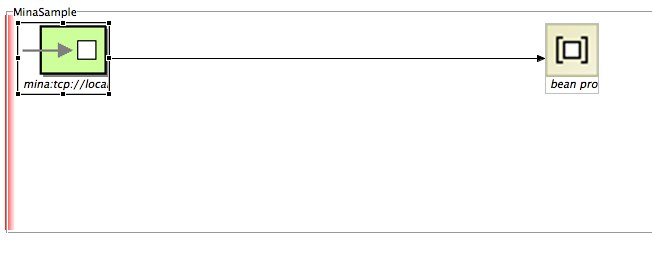
Here is a screenshot of the configuration in the FUSE IDE:


In this example, we're creating a MINA consumer endpoint that listens on port 8888, using the textline codec and sync means that we'll be using a synchronous exchange where the client can read a response from the MINA component.

To add a little more fun to this sample, you can add a simple bean to, for example, convert the payload to upper case. Really simple stuff but you get the idea as that step could be dropping that message into an ActiveMQ queue, executing another Camel component, etc.

So, here is a simple Java class to do that:

public class MyTcpMsgHandler {
public String myTcpMsgHandler(String msg){
return msg.toUpperCase();
}

}

Last development step is going to be adding the new Java bean into the route. To do that, right-click on the canvas and go to Add --> Endpoints --> Bean. Go to the Properties panel and then configure your recently create bean. Here is a sample configuration:


That's it! All the steps necessary to create your Camel route using camel-mina are there!

Here is a screenshot of what we just did with the complete route:


So, if you want to test that route (there are many ways to do that) you'll need a client to connect to that endpoint exposed by our route.
Here is a very simple client to test it:


package com.fusesource.fusebyexample;

import java.io.*;
import java.net.*;

class TCPClient{
 public static void main(String argv[]) throws Exception{

String sentence = null;
   String modifiedSentence;
   boolean clientUp = true;
  
BufferedReader inFromUser = new BufferedReader( new InputStreamReader(System.in));
   Socket clientSocket = new Socket("localhost", 8888);
   DataOutputStream outToServer = new DataOutputStream(clientSocket.getOutputStream());
   BufferedReader inFromServer = new BufferedReader(new InputStreamReader(clientSocket.getInputStream()));
  
while(clientUp = true){
sentence = inFromUser.readLine();
outToServer.writeBytes(sentence + '\n');
  modifiedSentence = inFromServer.readLine();
  System.out.println("FROM SERVER: " + modifiedSentence);
  if(modifiedSentence.equals("STOP")){
  clientSocket.close();
  System.out.println("Stopping TCP Client...");
    System.exit(0);
  }
}
 }
}


Don't forget to include camel-mina dependency in your POM file before you deploy your Camel route.

Next, let's test our route. Right-click on your camel-context.xml file and then select Run As... --> Local Camel Context. Watch the FUSE IDE console for any issues being reported or for a successful deployment. You can also run the Camel route manually by executing the following command:

$ mvn camel:run

Also, run the sample client which opens a prompt for you to type a message. Type for example "apache camel rocks!" and you should see a reply back like this: FROM SERVER: APACHE CAMEL ROCKS! as the result of our processing of the message by our bean.

This sample demonstration code is also available on GitHub: https://github.com/mjabali/MinaSample

Enjoy the ride!


Saturday, August 13, 2011

Throttler Enterprise Integration Pattern Demo

The second video demonstration posted to the FuseSource website describes the Throttler EIP (Enterprise Integration Pattern) pattern and shows you how you can achieve that with Camel and the Fuse IDE.

So, take a look on the video below to understand more about the pattern.


Enjoy the ride!


Endpoint Browsing and Route Tracing with Fuse IDE

This week two 5-minute demos were posted to the FuseSource website. The first one describes how to do endpoint browsing and route tracing with Fuse IDE.

I've linked the video here too, so you can take a look on these features.


Enjoy the ride!

Tuesday, August 9, 2011

Reducing Spring Dependency with Apache Camel 2.9

Claus Ibsen (@davsclaus) brilliantly blogged about a new fundamental change on Apache Camel 2.9. Basically, the goal is to reduce the dependency of the Spring framework JAR files in the core components of Camel and other components where they are used.

You can read more about this exciting change on Claus' blog entry http://davsclaus.blogspot.com/2011/08/apache-camel-29-reduced-dependency-on.html

Enjoy the ride!

Thursday, August 4, 2011

New Fuse IDE 2.0 Release


Now at version 2.0, the Fuse IDE (an Eclipse plugin) builds on a visual environment that enables developers to "drag-and-drop" the integration and mediation components needed to connect several systems and applications. I'd like to give you some highlights of this very exciting release.

Additionally to the already known features (http://fusesource.com/collateral/112/), here is what's included:

  • Endpoint browsing – which makes it easy to see and inspect the available messages on endpoints or JMS  queues

  • Message drag and drop – from an endpoint or JMS queue to any Camel endpoint or JMS destination to quickly try out integration scenarios
  • JMX explorer – tailored to view Fuse integration applications

  • Graphical viewer – displays all brokers, queues, topics, Camel endpoints, and Camel routes available in a remote JVM

  • Route tracing – step through each version of each message to see how message headers and bodies change as they move through routes

So, don't wait to try out these new features... download the new Fuse IDE, provide feedback and we can make it even better!

Enjoy the ride!

Thursday, July 21, 2011

Using Apache Camel to Monitor SNMP-enabled devices

I've been working with a hardware manufacturer company this week that wanted to use Apache Camel to get information about SNMP-enabled (http://en.wikipedia.org/wiki/Simple_Network_Management_Protocol) devices.

As you may know, Apache Camel has a SNMP component (http://camel.apache.org/snmp.html) able to poll devices or receive SNMP traps.

Here is a very simple Camel route example that we used to get started with the camel-snmp component:


<?xml version="1.0" encoding="UTF-8" standalone="no"?>
<!-- Configures the Camel Context-->
<beans xmlns="http://www.springframework.org/schema/beans" xmlns:camel="http://camel.apache.org/schema/spring" xmlns:xsi="http://www.w3.org/2001/XMLSchema-instance" xsi:schemaLocation="        http://www.springframework.org/schema/beans http://www.springframework.org/schema/beans/spring-beans.xsd        http://camel.apache.org/schema/spring http://camel.apache.org/schema/spring/camel-spring.xsd">

  <camelContext xmlns="http://camel.apache.org/schema/spring">
    <package>com.fusesource.fusebyexample</package>
    <route id="SNMP-Sample-Route">
        <from uri="snmp:1.1.1.12:161?
                   protocol=udp&amp;
                   type=POLL&amp;
                   delay=10&amp;
                   oids=1.3.6.1.2.1.1.3.0"/>
        <log logName="SNMP_LOG" 
             loggingLevel="INFO" 
             message="&gt;&gt;&gt; ${body}"/>
    </route>
</camelContext>

</beans>


So, the snmp-camel component has many configuration options but you basically have to provide the following:


snmp://hostname[:port][?Options]


Additionally, you have the following options:


On our example, we added the following (additionally to the hostname and port number of the host we wanted to get information from) to test the configuration:

protocol=UDP - You can either use UDP or TCP protocols

type=POLL - You can enter POLL or TRAP to define whether the camel component is going to poll the device for info and create a listener for SNMP trap events

delay=10 - Frequency you want to poll the device for information

oids=1.3.6.1.2.1.1.3.0 - In this particular example, we setup the OID which retrieves the amount of time the device is up (http://www.oid-info.com/get/1.3.6.1.2.1.1.3.0)

The last piece of our Camel route was just a log component because we wanted to see what was coming back from the device. That's all!

We also used the FUSE IDE to rapidly test the scenario we wanted and that was pretty straightforward. The FUSE IDE can be downloaded from (http://fusesource.com/products/fuse-ide-camel/).

Don't forget to include camel-snmp as a dependency in your pom.xml file if you're using Maven which
should be like this:

<dependency>
    <groupId>org.apache.camel</groupId>
    <artifactId>camel-snmp</artifactId>
    <version>${camel-version}</version>
</dependency>


Enjoy the ride!

Friday, July 8, 2011

Calling Web Services with Apache Camel

Web Services are very important components of most (if not all) of the integration projects these days. The Web Services architecture make them extremely useful for distributed applications and they are often associated with Service-Oriented Architecture (SOA).

Calling Web Services from Apache Camel is pretty simple yet powerful and Camel uses Apache CXF (http://cxf.apache.org).

Apache CXF provides you many options to build Web Services (JAX-WS Annotated Services from Java, JAX-WS Annotated Services from WSDL, JAX-WS Providers, Simple Frontend and JavaScript).
Additionally, there are three major types of services (SOAP, REST and CORBA). For more information, check this web page http://cxf.apache.org/docs/how-do-i-develop-a-service.html.

JAX-WS (Java API for XML Web Services) specification defines annotations that allow you to tell CXF how your POJOs should be represented on the web.

Basically, there two types of web services development with Apache CXF:

Contract-first development - Recall that WSDLs define what operation and types a web service provides. This is often referred to as web services contract, and in order to communicate with a web service, you must satisfy the contract. Contract-first development means that you develop a WSDL file and then generate stub Java class implementations using a tool like Apache CXF.

Code-first development - The other way to develop web services is by starting out with a Java class and then letting the web service framework handle the job of generating a WSDL contract for you. In this case, Apache CXF will be in control of what the contract will be.

To configure the CXF component URI in Camel there are two main ways that you can do that:

Configuring Using the URI Options - The most simple way (and the one will be using for demo purposes) where you pass inline parameters to the component. Here is the format you have to specify:

cxf://<service_address>[?options]

The options available for the CXF component are available here: http://camel.apache.org/cxf.html

Referencing a Bean - Using this approach, you have to specify a bean containing the configuration. You have much more power and flexibility than configuring CXF via URI options but it also requires more work on your side. You can configure things like CXF interceptors, JAX-WS handlers and the CXF bus but we're going to cover that on a different blog post. To configure the CXF component referencing a bean the URI is something like this:

cxf:bean:beanName where the beanName specifies the ID of the CXF endpoint bean defined in your Spring XML file.

So, to give you a taste of what's going to be a simple project calling Web Services with Apache Camel here is the step-by-step procedure:

I'll be using the FuseIDE for that but the artifacts generated are pretty much the same if you choose the Maven approach.

Here is what you need:

- Eclipse IDE (Eclipse Helios 3.6.2)
- Apache Maven (3.0.3)
- FuseSource Camel IDE (http://fusesource.com/products/fuse-ide-camel/)


Then, create a new Fuse IDE project and select the Camel Archetype and type the Group Id, Artifact Id and Package name for your project then click Finish.


As I've explained before on my previous post (http://marcelojabali.blogspot.com/2011/06/file-batch-splitter-with-apache-camel.html) the default Fuse IDE project comes with a sample configuration that you can remove for the purpose of this demonstration.


Create a new Camel XML File (camelContext.xml) and then create a new route. 


Drag and drop an endpoint from the palette and also a log component. Connect them and make sure you save your project. You should see something like the picture below:


Edit the URI property of the Endpoint to be: file:src/data?noop=true


Edit the Message property of the Log component to be: ${body} and the Logging Level to INFO


You should be able to run this route now which is going to display the content of files under the src/data directory in your project in the Camel log. It's always a good practice to make sure every step in your route runs consistently and without any problems.


To run the Camel route (if you're using the FuseIDE) just right click int the Camel XML file and then select Run As... Local Camel Context.


If everything executed correctly you should see the content of the files in the Eclipse console and you're ready for the next step.


Add another Endpoint to your route. Connect the Log component to the new created Endpoint.

The recently added Endpoint is going to be our CXF component. We're going to use a sample Stock Quote Web Service available at http://www.webservicex.net/WS/WSDetails.aspx?CATID=2&WSID=9

Click on the Endpoint and then add the following to the URI:

cxf://http://www.webservicex.net/stockquote.asmx?wsdlURL=src/main/resources/META-INF/stockquote.wsdl&serviceName={http://www.webserviceX.NET/}StockQuote&portName={http://www.webserviceX.NET/}StockQuoteSoap&dataFormat=MESSAGE

Here are the options being used on this simple call:

cxf://http://www.webservicex.net/stockquote.asmx - Endpoint definition (cxf) and then the required service address

wsdlURL=src/main/resources/META-INF/stockquote.wsdl - The location of the WSDL file

serviceName={http://www.webserviceX.NET/}StockQuote - The service name this service is implementing, it maps to wsdl:service@name

portName={http://www.webserviceX.NET/}StockQuoteSoap - The port name this service is implementing, it maps to wsdl:port@name

dataFormat=MESSAGE - The data type messages supported by the CXF endpoint (default is POJO)


The last step in the route to be implemented is a Log component to display the Web Service response. To do that, just add another Log and connect the CXF component to it.


Edit the Message property of the Log component to be: ${body} and the Logging Level to INFO


Your route should be similar to the following:


Save the project.


For reference, here is the whole route:


<?xml version="1.0" encoding="UTF-8" standalone="no"?>
<beans xmlns="http://www.springframework.org/schema/beans" 
xmlns:cxf="http://camel.apache.org/schema/cxf" 
xmlns:xsi="http://www.w3.org/2001/XMLSchema-instance" 
xsi:schemaLocation="http://www.springframework.org/schema/beans  
    http://www.springframework.org/schema/beans/spring-beans-3.0.xsd
    http://camel.apache.org/schema/spring
    http://camel.apache.org/schema/spring/camel-spring.xsd">

  <camelContext xmlns="http://camel.apache.org/schema/spring" trace="false">
    <route id="my_Sample_Camel_Route_with_CXF">
        <from uri="file:src/data?noop=true"/>
        <log loggingLevel="INFO" message="&gt;&gt;&gt; ${body}"/>
        <to uri="cxf://http://www.webservicex.net/stockquote.asmx?
        wsdlURL=src/main/resources/META-INF/stockquote.wsdl&amp;
        serviceName={http://www.webserviceX.NET/}StockQuote&amp;
        portName={http://www.webserviceX.NET/}StockQuoteSoap&amp;
        dataFormat=MESSAGE"/>
        <log loggingLevel="INFO" message="&gt;&gt;&gt; ${body}"/>
    </route>
</camelContext>

</beans>


Before you test it make sure you change the values of the sample messages (under src/data) to the following:


message1.xml:


<?xml version="1.0" encoding="utf-8"?>


<soap12:Envelope xmlns:xsi="http://www.w3.org/2001/XMLSchema-instance" xmlns:xsd="http://www.w3.org/2001/XMLSchema" xmlns:soap12="http://www.w3.org/2003/05/soap-envelope">
  <soap12:Body>
    <GetQuote xmlns="http://www.webserviceX.NET/">
      <symbol>AAPL</symbol>
    </GetQuote>
  </soap12:Body>
</soap12:Envelope>

message2.xml:

<?xml version="1.0" encoding="utf-8"?>
<soap12:Envelope xmlns:xsi="http://www.w3.org/2001/XMLSchema-instance" xmlns:xsd="http://www.w3.org/2001/XMLSchema" xmlns:soap12="http://www.w3.org/2003/05/soap-envelope">
  <soap12:Body>
    <GetQuote xmlns="http://www.webserviceX.NET/">
      <symbol>GOOG</symbol>
    </GetQuote>
  </soap12:Body>
</soap12:Envelope>

This is the SOAP format that the web service is expecting and we're not doing any message transformation here so far.
At this point, you're ready to go and you just need to run the Camel route as explained before.
After you run the route, you should see two messages being displayed in the Eclipse console with the content of the files you just edited and then two responses from the Web Service showing the stock value of AAPL and GOOG.

The sample code is available at https://github.com/mjabali/CXF-Sample

Enjoy the ride!


Setting Up Local Environment for Developing Oracle Intelligent Bots Custom Components

Oh the joy of having a local development environment is priceless. For most cloud based solutions the story repeats itself being hard to tr...