Showing posts with label apache. Show all posts

Monday, April 30, 2012

Accessing Databases with HTML5 WebSockets and Apache Camel

As I have said on my previous post, I've been working with several companies with the most diverse use cases and one that really brought my attention was the requirement to access databases using HTML5 WebSockets which seems to be a clever thing to do with the right tools.

So, basically what I've setup for this is represented on the picture below:


Let's go over the implementation details of all of the components described here:

From right to left, the backend datasource I had to use was MySQL that you can download from http://www.mysql.com/downloads/. Then, I used Apache Camel as the backend framework accessing the database and also exposing a TCP-based component (Mina in this case). Moving to the left, we have the Kaazing WebSocket Gateway connecting to the Apache Camel framework and exposing WebSocket connectivity to the web clients (browser-based, mobile-based and desktop thick client applications).

The web-browser sample client is pretty straightforward and with a few lines of code you can get the functionality. There are sample javascript clients shipped with the Kaazing WebSocket Gateway that you can re-use or modify to your needs. The Kaazing WebSocket Gateway documentation set is also helpful and good starting point. Check it out: http://tech.kaazing.com/documentation/html5/3.3/o_dev_js.html

Then the only change you have to make in the Kaazing WebSocket Gateway is in the gateway-config.xml (under $KWG_HOME/conf) to include the service you want to expose to the web clients and where you want to connect to the backend framework with access to the database.

Here is what I have included on my configuration:

<!-- Demo JDBC Backend System Config -->
  <!-- Proxy service --> 
  <service>
<accept>ws://${gateway.hostname}:${gateway.extras.port}/jdbc</accept> 
<type>proxy</type>
<properties>
<connect>tcp://${gateway.hostname}:8888</connect>
</properties>
   </service>

Check the Kaazing WebSocket Gateway documentation to get more familiar with these settings.

Last but not least, the Apache Camel route hosting the Mina endpoint and the database connectivity:

 <camelContext xmlns="http://camel.apache.org/schema/spring">
    <package>com.kaazing.gateway.demo.db</package>
    <route id="WSMinaJDBCSample">
        <from uri="mina:tcp://localhost:8888?timeout=30000"/>
        <log message="RECEIVED: ${body}"/>
        <setBody>
        <simple>select * from customers where customers.email = '${body}'</simple>
        </setBody>
        <to uri="jdbc:myDataSource"/>
        <log message="GENERATED: ${body}"/>
    </route>
</camelContext>


<!-- MySQL datasource -->
  <bean class="org.springframework.jdbc.datasource.DriverManagerDataSource" id="myDataSource">
    <property name="driverClassName" value="com.mysql.jdbc.Driver"/>
    <property name="url" value="jdbc:mysql://localhost:3306/test"/>
    <property name="username" value="root"/>
    <!-- <property name="password" value="XXXXX"/>  -->
  </bean>


The MySQL database setup is very simple and you can use any sample database tables you want. Just make sure you update the Apache Camel route and your environment settings accordingly.

Code will be available soon...

UDPATE:
Sample code is now available at: https://github.com/mjabali/DBOverWS

Tuesday, April 10, 2012

It's not lack of content...

We all have that excuse of no time for blogging or lack of interesting content for not updating our tech-y blogs but in fact there are tons of interesting things that I'm working on right now like a JDBC over WebSocket project which seems to be a really nice thing to do and also an end-to-end prototype that we at Kaazing put together for an airline company.

Basically, the airline use case goes from backend JMS-based systems to mobile devices over WebSocket using Kaazing WebSocket Gateway JMS Edition notifying the users about gate changes and flight cancellations. You gotta see this in action! It's super cool... Since it has some proprietary systems I won't be able to show you all parts but I've been working on a generic version of it where you can install all the pieces in your machine and run the whole thing locally. Ping me if you want to take a look on that.

The other project that I'm working on is the JDBC over WebSocket which basically uses Kaazing WebSocket Gateway HTML5 Edition to connect to an Apache Camel route with a Mina component and JDBC access to a MySQL database. Everything is pretty straightforward and I'll be writing a tutorial on that in the near future. But, if you need any additional info or sample code just let me know and I'll walk you thru whatever is needed to get you going...

Stay tuned!

Tuesday, December 27, 2011

Getting Started with Apache Camel (Video)

In this video demonstration, published on the FuseSource YouTube channel, you're going to see how to get started with Apache Camel (FUSE Mediation Router) on a real world scenario working with a Composed Enterprise Integration Pattern (FUSE EIP).

The video demonstration talks about a Book Shop example application that receives a message from a JMS source, in this case Apache ActiveMQ / FUSE Message Broker and then split the message according to number of orders available in the message, then based on the content the message is going to be routed to different web services endpoints (provided by Apache CXF / FUSE Services Framework), after that the requests to the web services are then aggregated through the Apache Camel aggregator component and finally the resulting message is sent to a response JMS queue.


Enjoy the ride...

Wednesday, November 30, 2011

Virtual and Composite Destinations with Apache ActiveMQ

Apache ActiveMQ / FUSE Message Broker has a feature called Virtual Destinations that are logical destinations (queues or topics) mapped to one or more physical destinations.

There are many benefits for using Virtual Destinations with ActiveMQ but basically you can forward messages from one JMS destination to many destinations (mixing queues and topics if you want), route messages to target destinations based on message headers (a.k.a broker-based message routing) and create highly-available load-balanced durable subscribers.


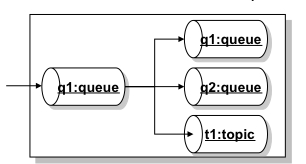
As an example, looking in the diagram above, you can have a Virtual Destination called q1, where applications will send messages to as they do to any other regular queue, and then the message will get propagated to a real physical queue called q1, to a real queue physical queue called Q2 and also to a topic called T1.

The example above is called Composite Destinations and the idea behind it is to map a Virtual Destinations to a hard-wired collection of physical destinations. From the JMS client application perspective there is nothing you'll need to change since all the configuration happens at the broker level.

So, let's look on what need to be done to work with Virtual and Composite Destinations with ActiveMQ.


The diagram above represents the idea of having producer P sending messages to a queue called CompositeQueue.q (it doesn't have to be called that way).
That queue is rooting messages to a topic called Topic.a and a queue called Queue.b.

All of the required configuration is done in the ActiveMQ XML configuration file. Below, there is snippet of the broker configuration file where the above example is configured.


<broker ...>
    <destinationInterceptors>
      <virtualDestinationInterceptor>
        <virtualDestinations>
          <compositeQueue name=“CompositeQueue.q">
            <forwardTo>
               <topic physicalName=“Topic.a" />
               <queue physicalName=“Queue.b" />
            </forwardTo>
          </compositeQueue>
        </virtualDestinations>
      </virtualDestinationInterceptor>
    </destinationInterceptors>
  </broker>

The interesting thing here is that you can mix queues and topics without making any changes in the client code and this is not part of the JMS specification.

You can also extend that to use composite topics pretty much on the same way… Below you'll find a similar broker configuration to use Virtual Topics:


<broker ...>
    <destinationInterceptors>
      <virtualDestinationInterceptor>
        <virtualDestinations>
          <compositeTopic name="VirtualTopic.A">
    <forwardTo>
           <queue physicalName="FOO" />
           <topic physicalName="BAR" />
    </forwardTo>
          </compositeTopic>
        </virtualDestinations>
      </virtualDestinationInterceptor>
    </destinationInterceptors>
  </broker>

So, with a simple change in the ActiveMQ broker configuration you can dramatically change the way
the system works and extend it to your needs without changing the client application.


Friday, November 25, 2011

Load-balanced Ordered Message Processing with Apache ActiveMQ

On my previous post (Preserving Message Order with Apache ActiveMQ) we took a look on what would be necessary to preserve message order using Apache ActiveMQ (FUSE Message Broker). We then explored on the ActiveMQ capabilities called Exclusive Consumers.

But, Exclusive Consumers bring one disadvantage that is having active consumers not doing anything (actually not consuming messages) and that may be not the desired behavior. So, let's take a look on how ActiveMQ (FUSE Message Broker) can help to avoid that situation and explore what capabilities and/or techniques are available to process messages in order when multiple consumers are active.

ActiveMQ has a feature called Message Groups which is the way to load balance multiple active consumers listening to the same queue while preserving message order. ActiveMQ will then group messages on the queue and it will guarantee that all messages of a particular group arrive in order on the same consumer.

So, to give you an example, let's say we're processing records about drivers (adding new drivers, updating drivers' information, processing speed tickets, revoking tickets, etc). You definitely don't want to process the revoke information before the ticket record because that would cause a lot of problems when the ticket doesn't exist yet and the application will try to update its information. Then, to solve that problem we could group messages by driver's license number and then let the message broker process them accordingly. Now, from the global sense the messages may not be processed in order but from the important business application sense of related messages they are delivered in the preserved order.

In the picture below, messages addressed with the same JMSXGroupID, in this case "GRP1" and "GRP2", will be pushed to a unique consumer, in other words, Consumer A will get messages that contain the JMSXGroupID equals to GRP1 and Consumer B will get messages that contain the property JMSXGroupID equals to GRP2.


In summary, ActiveMQ will correlate messages based on the property JMSXGroupsID and will deliver those to the same consumer.

On a side note, messages without a group (meaning messages with no value specified in the JMSXGroupID header property) will be distributed (load balanced) among active consumers as they would be in the normal ActiveMQ queue message processing.

But, how to implement message groups?

Very simple… the only thing you have to do is to set the JMSXGroupID property on the client producer before you send the message with whatever value you want to use for correlation. The broker itself will take care of everything else for you.

Here is a snippet of a Java client producer creating a JMS Text Message and then setting the JMSXGroupID property:

Message message = session.createTextMessage(<foo>hey</foo>);
message.setStringProperty(JMSXGroupID, Msg_group_1);


In the example above, all messages in the queue with JMSXGroupID set to Msg_group_1 will be directed exclusively to a single consumer.

How the messages reach the correct consumer then?

Well, the message broker maintains an internal hash map with the Group IDs and the consumers receiving messages for that specific group.

The consumer will then receive messages for that group until it drops the connection or a producer closes the message group by sending a message with a property called JMSXGroupSeq containing the value of -1 (minus one). That's going to be the flag telling the message broker that the group is no longer needed and the reference in the hash table can be removed.

For new message groups, the broker does a random selection of the active consumers and then start placing messages on that consumer.

So, to illustrate how to close a group, the following code shows the Java producer client closing the Msg_Group_1:

Message message = session.createTextMessage(<foo>bar</foo>);
message.setStringProperty(JMSXGroupIDMsg_group_1);
message.setIntProperty(JMSXGroupSeq-1);
producer.send(message);


Then, if another message is sent to the same message group ID, the message broker will handle that as a new message group randomly assigned to a new consumer.


Thursday, November 17, 2011

Preserving Message Order with Apache ActiveMQ


There are some use cases and business scenarios where you have to process messages in order. Basically, when multiple consumers receive messages from a queue and process them in parallel, message order is not preserved.

Apache ActiveMQ has the capability to process messages in order using a feature called Exclusive Consumers. With Exclusive Consumers all messages from a single queue are processed by only one consumer (other consumers listening on the same queue will take over if the exclusive consumer fails).

So, fundamentally the diagram below shows how Exclusive Consumers work where Consumer A and Consumer B are both listening to the same queue but only the Consumer A is consuming messages from it.


The Exclusive Consumer feature is configured at the consumer level, so at the code level you have to explicitly say what queue you're listening in and also say you're an an exclusive consumer.

Here is a piece of code showing how to set the Exclusive Consumer:


queue = new ActiveMQQueue(“TEST.QUEUE?consumer.exclusive=true”);


That's very simple and still powerful…


But, there's more to that! You also have the choice to set a priority for each consumer.

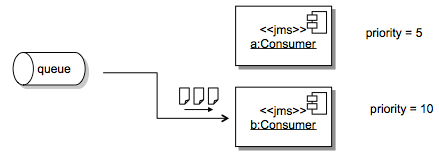
One way to ensure that high-priority applications get messages to process is to set the consumer priority. When multiple consumer request exclusive access to a queue, the consumer with the highest priority is selected by the broker.

So, another case for Exclusive Consumer priority is the machine speed you have available. You may want to give a higher priority for consumers deployed on faster machines and set the priority according to the resources you have available.

To set the Exclusive Consumer priority all you have to do is set another option on the consumer code like the below configuration:


queue = new ActiveMQQueue(“TEST.QUEUE?consumer.exclusive=true&consumer.priority=10");

The diagram below shows how the consumer priority would play with these settings.


One disadvantage of Exclusive Consumers is that you have active consumers doing nothing but we are going to cover how ActiveMQ helps you avoid that situation on a future post.

Stay tuned!


Wednesday, October 26, 2011

JMS and Database Integration with Apache ServiceMix, Camel and ActiveMQ

I've been asked to create a simple project to demonstrate how Apache ActiveMQ, Camel and ServiceMix could be used in the same integration context. Then, for the specific customer I was talking to, I decided to create something related to the world they were used to.

This example will process messages as they are delivered on an input queue and I thought that XML would be a good format to also demonstrate how to parse the payload and generate an SQL statement  before hitting the database.

In summary, for each message going to the input queue, we're going to create a record in the database table and then generate a response message on the output queue.

I'm assuming you're already have Apache ServiceMix downloaded and installed in your machine. If not, it's time to download it… I recommend you to just go to http://fusesource.com/downloads/ and download FUSE ESB.

I'm also assuming that you already have Maven installed but if not feel free to download and install it from maven.apache.org


Here are the steps to create this short and simple demonstration:


1) Download and install MySQL database from http://dev.mysql.com/downloads/
You can use the default test database that's shipped with MySQL and the only thing you have to do is to create a table to insert test records. To do that, connect to the database  and run the following SQL statement:

CREATE table PARTNER_METRIC(partner_id int, time_occurred DATE, status_code int, perf_time long);


2) Install the following features in ServiceMix:

features:install camel-jdbc
features:install camel-jms


3) Install commons-dbcp bundle:

osgi:install -s mvn:org.apache.servicemix.bundles/org.apache.servicemix.bundles.commons-dbcp/1.2.2_6


4) When you do this you will receive a bundle id, e.g. 229.  Enable dynamic imports on this bundle so that it can pick up the appropriate database driver.

dev:dynamic-import 229


5) Using ServiceMix hot deploy feature to deploy the MySQL JDBC driver:

cp /Applications/MySQL/mysql-connector-java-5.1.18/mysql-connector-java-5.1.18-bin.jar  /Users/mjabali/Fuse/apache-servicemix-4.4.1-fuse-00-08/deploy/


Then you can verify that the driver gets deployed correctly with the following command:

karaf@root> list |grep -i mysql


and you should get a message similar to the following:

[ 227] [Active     ] [            ] [       ] [   60] Sun Microsystems' JDBC Driver for MySQL (5.1.18)


6) Download the source files of this sample and extract them on the directory of your choice. So, let's review the JMS and Database connection settings  in the following resource files:

$PROJECT_HOME/src/test/resources/sample/RiderAutoPartsPartnerTest.xml
$PROJECT_HOME/src/main/resources/META-INF/spring/beans.xml file

These are the same file albeit named differently. One is used by the bundle and the other by our test case.

We'll be also using the default Apache ActiveMQ instance for the messaging aspect of this tutorial.
To check whether the ActiveMQ is installed, up and running you can run the following command:

karaf@root> osgi:list |grep activemq-broker


and you should see an output similar to this

[  66] [Active     ] [Created     ] [       ] [   50] activemq-broker.xml (0.0.0)


You can see the default broker's definition within the activemq-broker.xml file under $SERVICEMIX_HOME/etc/activemq-broker.xml

The database source definition is on the beans.xml file and you may want to adjust it to reflect the settings on your environment. Here is a copy of the definitions I have on my machine:

<bean id="myDataSource" class="org.apache.commons.dbcp.BasicDataSource" destroy-method="close">

    <property name="driverClassName" value="com.mysql.jdbc.Driver"/>

    <property name="url" value="jdbc:mysql://localhost/test"/>

    <property name="username" value="root"/>

    <property name="password" value="XXXX"/>

</bean>

7) Let's compile the code then… Run the following command on the root directory of the project

mvn clean install -Dmaven.test.skip=true


If the code builds up successfully then you're ready to deploy on ServiceMix.

8) To deploy the bundle into ServiceMix, run the following command:

karaf@root>osgi:install mvn:com.fusesource.fusebyexample/camel-jms-dbase/1.0-SNAPSHOT


A confirmation that the bundle was deployed successfully should be returned to you and a message similar to the follow one should be displayed:

Bundle ID: 228


Then, you are ready to start the bundle and verify if has started correctly. Follow the instructions below to do that:

To start the bundle:

karaf@root>osgi:start <bundle ID>


To verify the bundle has started correctly:

karaf@root>osgi:list |grep <bundle ID>


and then a message like the following should be displayed:

[ 228] [Active     ] [            ] [Started] [   60] Camel JMS Database Example (1.0.0.SNAPSHOT)


You can also immediately turn on the trace logging capability for Camel and get additional output in the ServiceMix log facility. To enable the trace logging just run:

karaf@root>set TRACE org.apache.camel


and then to see the ServiceMix log, run:

karaf@root>log:display


You should be able to see messages with the TRACE identifier similar to the below:

11:46:17,095 | TRACE | tnerRequestQueue | JmsMessageListenerContainer      | ?                                   ? | 94 - org.springframework.jms - 3.0.5.RELEASE | Consumer [ActiveMQMessageConsumer { value=ID:titan.local-54477-1319240594120-6:1:1:1, started=true }] of session [PooledSession { ActiveMQSession {id=ID:titan.local-54477-1319240594120-6:1:1,started=true} }] did not receive a message


9) To test this sample project all you have to do is to send a sample message (there is one included in the $PROJECT_HOME/src/test/resources/sample directory) to the ActiveMQ queue that the Camel route is listening for. You can use any approach you like but writing a JMS Test client is pretty simple and there are tons of examples on the Internet and also available in the ActiveMQ sample directory. You can also use tools like HermesJMS which adds a little UI for you so you don't need to create a test program.

Either way, after sending a message to the partnerRequestQueue (default queue name used on this tutorial) you should see a couple of messages in the ServiceMix console like those below:

karaf@root>  **** toSql returning: INSERT INTO PARTNER_METRIC (partner_id, time_occurred, status_code, perf_time) VALUES ('123', '200911150815', '200', '9876')

 **** fromSql returning: Sample message to be returned on reply queue


You can verify that the values were inserted into the MySQL database running a simple query like:

select * from PARTNER_METRIC;


It is also recommended to check the ServiceMix log to make sure there are no exceptions there.

The sample code for this tutorial is available on GitHub: https://github.com/mjabali/JMS-DB-Sample

I also would like to thank my colleague Susan Javurek for putting an extra effort on this and helping out with the sample code.

UPDATE: I also would like to say a big thanks to Claus Ibsen (@davsclaus) for reminding me that all the manual steps related to OSGi bundles installation could be automated using the feature capability that consists in deploy multiple related bundles into a larger unit of deployment.

Enjoy the ride...

Friday, October 21, 2011

Using Apache Camel for Application Notification

I was watching a forum thread (http://fusesource.com/forums/thread.jspa?threadID=3433) this week where the use case was not to consume the file content but rather the file name. That seems to be an interesting use of Apache Camel because most of people used the Camel File Component to consume the contents of the file and then do some kind of processing on top of that (routing, web services invocation, ftp, bean execution, database interaction, etc).

What brought my attention to this specific use case is that the important information here was the file name and not the content of the file. Given that the file itself was pretty large (around ~1GB) it would be a nightmare to handle all of that in memory on a Camel route or any other middleware available out there. But, this use case is really about notifying other systems or applications that a large file is available to be processed outside the route (think about a file being available for download for example) and the reason to only care about the file name is that information could be part of the URL generated during the processing of the Camel route.

So, basically the Camel route was watching the file system for files generated, then grabbed the file name and then notify another system or application (or even the end user i.e. e-mail) that the file was ready to be consumed. I've recreated below the Camel route generated by default in the sample project to illustrate how to do that.


<beans xmlns="http://www.springframework.org/schema/beans"
       xmlns:xsi="http://www.w3.org/2001/XMLSchema-instance"
       xmlns:camel="http://camel.apache.org/schema/spring"
       xsi:schemaLocation="
       http://www.springframework.org/schema/beans http://www.springframework.org/schema/beans/spring-beans.xsd
       http://camel.apache.org/schema/spring http://camel.apache.org/schema/spring/camel-spring.xsd">

<camel:camelContext xmlns="http://camel.apache.org/schema/spring">
    <camel:package>com.fusesource.fusebyexample</camel:package>
 <camel:route>
      <!-- Consume Files from the File System -->
      <camel:from uri="file:src/data/?noop=true"/>
      <!-- Set the Message Payload with the File Name --> 
      <camel:setBody>
          <camel:simple>header.CamelFileName</camel:simple>
      </camel:setBody>
      <camel:log message="The message contains ${body}"/>
      <!-- Perform simple Content-Based Routing -->
      <camel:choice>
      <camel:when>
          <camel:simple>${body} == 'message1.xml'</camel:simple>
          <camel:log message="Going to UK message"/>
          <camel:to uri="file:target/messages/uk"/>
        </camel:when>
        <camel:otherwise>
          <camel:log message="Going to Other message"/>
          <camel:to uri="file:target/messages/others"/>
        </camel:otherwise>
      </camel:choice>
    </camel:route>
  </camel:camelContext>
</beans>


Of course, if you want to try that out, the project is available at: https://github.com/mjabali/FileNameBasedRouter

Enjoy the ride!

Thursday, October 13, 2011

FuseSource Training in Brazil

Since the FuseSource Brazilian tour a couple of weeks ago I've been getting more and more questions about what's next for the region. Well, here is the next step... We're going to deliver an Apache ActiveMQ training class on Nov, 16-17 in São Paulo and an Apache ServiceMix with Camel training class on November, 18-19 also in São Paulo. We are still working to get a nice venue for the training in case you wonder where this is going to happen.

I've personally been involved in the FuseSource training and I can guarantee you that's a lot of fun and tons of good information.

Here is the URL with information about the training classes: http://fusesource.com/enterprise-support/open-enrollment/ but if you have any questions please don't hesitate to contact me through this blog, Twitter (@mjabali) or e-mail (marcelo@fusesource.com).

Hope to see you there...

Wednesday, October 5, 2011

Apache ActiveMQ Enhancements to JMS

The JMS (Java Message Service) specification is very well-known for those working with messaging platforms but it has been around for quite some time and honestly not getting updates lately which gives a lot of room for enhancements and extensions.

As you can imagine Apache ActiveMQ goes beyond the JMS spec and implement lots of cool things where you can gain more in functionality, performance and scalability.

Starting from the top ConnectionFactory object, ActiveMQ has its own called ActiveMQConnectionFactory, as other JMS providers also create their own specific factories, ActiveMQ enhances the JMS with some settings that you can activate right away with little configuration and definitely see gains in performance.  Of course, when you optimize for performance, most of the time, you have the trade-off of more CPU utilization but I think CPU cycles are getting really cheap when comparing with network bandwidth and disk I/O.

Here is a list of things you can use to optimize performance extending the JMS specification with Apache ActiveMQ:

disableTimeStampsByDefault - it sets whether or not you're going to include the Time Stamp in the message header. The story behind this is that when you create a JMS message (actually when you call the send() method) we have to make a call to the system kernel to get the time stamp. This setting could save you a trip to that level and save you some time optimizing performance if the time stamp is not required in your messaging application.

copyMessageOnSend - The Java Message Service specification says that inside the send method we have to make a deep copy of the message object before sending it from the client to the broker. Setting the copyMessageOnSend property to false (default is set to true) will save you a cycle as the client won't make that copy of the message saving local resources.

useCompression - I think the property name here is self explanatory... but the ActiveMQ client will compress the message payload before it goes to the broker. So, the question is why not to use compression all the time and send smaller messages over the wire? Well, in order to compress the message payload you're going to spend CPU time and then the point is CPU vs. I/O. It's a trade-off that you may have to consider... in other words, you'll have to consider spending more CPU to compress the message or more bandwidth sending larger messages. Personally, I believe (and have seem) that if you have the chance to use compression you definitely should.

objectMessageSerializationDefered - Imagine that you're sending an Object Message and you're using an embedded broker for example (client and broker running on the same JVM). What this feature really enables you to do is that you tell the client to delay the object serialization as long as it can until it needs to hit the wire or store the message on disk. Basically, everything inside the same JVM should not be serialized as marshalling and unmarshalling objects can also be expensive.

useAsyncSend - Let's say you're sending NON_PERSISTENT messages to the broker which is equal to non-blocking call with no immediate acknowledgement and in fact it's ver fast but still not reliable messaging.
On the other hand, you can also use PERSISTENT messages which is going to be a blocking call from the client to the broker. So, one of the things you can do is to set useAsyncSend to true (default is false) and then change the behavior of PERSISTENT delivery mode to be asynchronous and no acknowledgement would be expected. In reality,  the send() method will return immediately giving you more performance because it reduces the time that the message producer waits for the message to be delivered. Keep in mind that this setting can possibly cause message loss but that's another trade-off that you have to consider when designing your messaging infrastructure.
This is a good approach if you can tolerate some message loss... typically on systems where the most updated information (last message) is always what you care about or when you have a reconciliation process in place to catch those conditions.

useRetroactiveConsumer - This feature allows you to work with limited window of memory topics where you can configure a policy to deliver let's say for example the last 10 messages sent to the topic, the last 5MB of data that went through to that topic or simply the last message sent to the topic... and all of that without the need of durable subscribers :-)
This is actually far more lightweight than using durable subscribers and it's really easy to configure and very easy to use.
Finally, since this is not JMS standard, of course, it's not set by default.

For a complete list of ActiveMQ enhancements to the JMS specification see the ActiveMQ product documentation.

I hope this helps you to push the go-faster button in your messaging infrastructure.


Monday, September 12, 2011

Using the MINA component in Apache Camel

You may find yourself trying to solve an integration problem where one of the systems doesn't "talk" anything else other than TCP/IP or UDP/IP. At that point, you may start thinking about writing your own socket server or look for one in the Internet or even create your Camel component to do that.
Well, that's where the Apache Camel MINA component comes really handy and you don't need to reinvent the wheel.

Camel MINA is a transport component working with Apache MINA which is a network application framework that provides event-driven asynchronous API over various transports such as TCP/IP and UDP.

A very common use case is to deploy camel-mina as a proxy in a Camel route and then do whatever is needed with the data like converting it to the appropriate format for example.

To give you an example, here is something you can do easily to test how camel-mina can help you:

Using the FUSE IDE create a new FUSE Project and then open the default camel-context.xml file under $PROJECT_HOME/src/main/resources/META-INF/spring if it's not open for you.

You can simply remove the default route created in the project and start with a new one.

Add a new Route. Right-click on the canvas and then select Add --> Route.

Then,  add a new Endpoint, Right-click on the canvas and then select Add --> Endpoints --> Endpoint.

Go to the Properties panel and add the following to the Uri field:

mina:tcp://localhost:8888?textline=true&sync=true

Here is a screenshot of the configuration in the FUSE IDE:


In this example, we're creating a MINA consumer endpoint that listens on port 8888, using the textline codec and sync means that we'll be using a synchronous exchange where the client can read a response from the MINA component.

To add a little more fun to this sample, you can add a simple bean to, for example, convert the payload to upper case. Really simple stuff but you get the idea as that step could be dropping that message into an ActiveMQ queue, executing another Camel component, etc.

So, here is a simple Java class to do that:

public class MyTcpMsgHandler {
public String myTcpMsgHandler(String msg){
return msg.toUpperCase();
}

}

Last development step is going to be adding the new Java bean into the route. To do that, right-click on the canvas and go to Add --> Endpoints --> Bean. Go to the Properties panel and then configure your recently create bean. Here is a sample configuration:


That's it! All the steps necessary to create your Camel route using camel-mina are there!

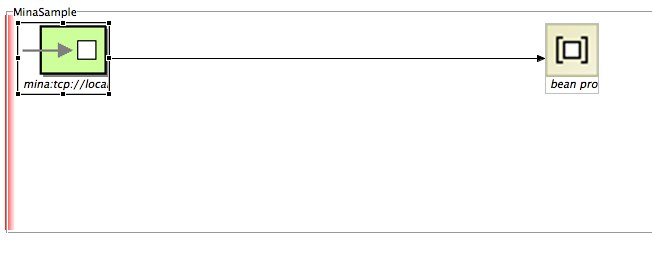
Here is a screenshot of what we just did with the complete route:


So, if you want to test that route (there are many ways to do that) you'll need a client to connect to that endpoint exposed by our route.
Here is a very simple client to test it:


package com.fusesource.fusebyexample;

import java.io.*;
import java.net.*;

class TCPClient{
 public static void main(String argv[]) throws Exception{

String sentence = null;
   String modifiedSentence;
   boolean clientUp = true;
  
BufferedReader inFromUser = new BufferedReader( new InputStreamReader(System.in));
   Socket clientSocket = new Socket("localhost", 8888);
   DataOutputStream outToServer = new DataOutputStream(clientSocket.getOutputStream());
   BufferedReader inFromServer = new BufferedReader(new InputStreamReader(clientSocket.getInputStream()));
  
while(clientUp = true){
sentence = inFromUser.readLine();
outToServer.writeBytes(sentence + '\n');
  modifiedSentence = inFromServer.readLine();
  System.out.println("FROM SERVER: " + modifiedSentence);
  if(modifiedSentence.equals("STOP")){
  clientSocket.close();
  System.out.println("Stopping TCP Client...");
    System.exit(0);
  }
}
 }
}


Don't forget to include camel-mina dependency in your POM file before you deploy your Camel route.

Next, let's test our route. Right-click on your camel-context.xml file and then select Run As... --> Local Camel Context. Watch the FUSE IDE console for any issues being reported or for a successful deployment. You can also run the Camel route manually by executing the following command:

$ mvn camel:run

Also, run the sample client which opens a prompt for you to type a message. Type for example "apache camel rocks!" and you should see a reply back like this: FROM SERVER: APACHE CAMEL ROCKS! as the result of our processing of the message by our bean.

This sample demonstration code is also available on GitHub: https://github.com/mjabali/MinaSample

Enjoy the ride!


Tuesday, August 9, 2011

Reducing Spring Dependency with Apache Camel 2.9

Claus Ibsen (@davsclaus) brilliantly blogged about a new fundamental change on Apache Camel 2.9. Basically, the goal is to reduce the dependency of the Spring framework JAR files in the core components of Camel and other components where they are used.

You can read more about this exciting change on Claus' blog entry http://davsclaus.blogspot.com/2011/08/apache-camel-29-reduced-dependency-on.html

Enjoy the ride!

Friday, July 8, 2011

Calling Web Services with Apache Camel

Web Services are very important components of most (if not all) of the integration projects these days. The Web Services architecture make them extremely useful for distributed applications and they are often associated with Service-Oriented Architecture (SOA).

Calling Web Services from Apache Camel is pretty simple yet powerful and Camel uses Apache CXF (http://cxf.apache.org).

Apache CXF provides you many options to build Web Services (JAX-WS Annotated Services from Java, JAX-WS Annotated Services from WSDL, JAX-WS Providers, Simple Frontend and JavaScript).
Additionally, there are three major types of services (SOAP, REST and CORBA). For more information, check this web page http://cxf.apache.org/docs/how-do-i-develop-a-service.html.

JAX-WS (Java API for XML Web Services) specification defines annotations that allow you to tell CXF how your POJOs should be represented on the web.

Basically, there two types of web services development with Apache CXF:

Contract-first development - Recall that WSDLs define what operation and types a web service provides. This is often referred to as web services contract, and in order to communicate with a web service, you must satisfy the contract. Contract-first development means that you develop a WSDL file and then generate stub Java class implementations using a tool like Apache CXF.

Code-first development - The other way to develop web services is by starting out with a Java class and then letting the web service framework handle the job of generating a WSDL contract for you. In this case, Apache CXF will be in control of what the contract will be.

To configure the CXF component URI in Camel there are two main ways that you can do that:

Configuring Using the URI Options - The most simple way (and the one will be using for demo purposes) where you pass inline parameters to the component. Here is the format you have to specify:

cxf://<service_address>[?options]

The options available for the CXF component are available here: http://camel.apache.org/cxf.html

Referencing a Bean - Using this approach, you have to specify a bean containing the configuration. You have much more power and flexibility than configuring CXF via URI options but it also requires more work on your side. You can configure things like CXF interceptors, JAX-WS handlers and the CXF bus but we're going to cover that on a different blog post. To configure the CXF component referencing a bean the URI is something like this:

cxf:bean:beanName where the beanName specifies the ID of the CXF endpoint bean defined in your Spring XML file.

So, to give you a taste of what's going to be a simple project calling Web Services with Apache Camel here is the step-by-step procedure:

I'll be using the FuseIDE for that but the artifacts generated are pretty much the same if you choose the Maven approach.

Here is what you need:

- Eclipse IDE (Eclipse Helios 3.6.2)
- Apache Maven (3.0.3)
- FuseSource Camel IDE (http://fusesource.com/products/fuse-ide-camel/)


Then, create a new Fuse IDE project and select the Camel Archetype and type the Group Id, Artifact Id and Package name for your project then click Finish.


As I've explained before on my previous post (http://marcelojabali.blogspot.com/2011/06/file-batch-splitter-with-apache-camel.html) the default Fuse IDE project comes with a sample configuration that you can remove for the purpose of this demonstration.


Create a new Camel XML File (camelContext.xml) and then create a new route. 


Drag and drop an endpoint from the palette and also a log component. Connect them and make sure you save your project. You should see something like the picture below:


Edit the URI property of the Endpoint to be: file:src/data?noop=true


Edit the Message property of the Log component to be: ${body} and the Logging Level to INFO


You should be able to run this route now which is going to display the content of files under the src/data directory in your project in the Camel log. It's always a good practice to make sure every step in your route runs consistently and without any problems.


To run the Camel route (if you're using the FuseIDE) just right click int the Camel XML file and then select Run As... Local Camel Context.


If everything executed correctly you should see the content of the files in the Eclipse console and you're ready for the next step.


Add another Endpoint to your route. Connect the Log component to the new created Endpoint.

The recently added Endpoint is going to be our CXF component. We're going to use a sample Stock Quote Web Service available at http://www.webservicex.net/WS/WSDetails.aspx?CATID=2&WSID=9

Click on the Endpoint and then add the following to the URI:

cxf://http://www.webservicex.net/stockquote.asmx?wsdlURL=src/main/resources/META-INF/stockquote.wsdl&serviceName={http://www.webserviceX.NET/}StockQuote&portName={http://www.webserviceX.NET/}StockQuoteSoap&dataFormat=MESSAGE

Here are the options being used on this simple call:

cxf://http://www.webservicex.net/stockquote.asmx - Endpoint definition (cxf) and then the required service address

wsdlURL=src/main/resources/META-INF/stockquote.wsdl - The location of the WSDL file

serviceName={http://www.webserviceX.NET/}StockQuote - The service name this service is implementing, it maps to wsdl:service@name

portName={http://www.webserviceX.NET/}StockQuoteSoap - The port name this service is implementing, it maps to wsdl:port@name

dataFormat=MESSAGE - The data type messages supported by the CXF endpoint (default is POJO)


The last step in the route to be implemented is a Log component to display the Web Service response. To do that, just add another Log and connect the CXF component to it.


Edit the Message property of the Log component to be: ${body} and the Logging Level to INFO


Your route should be similar to the following:


Save the project.


For reference, here is the whole route:


<?xml version="1.0" encoding="UTF-8" standalone="no"?>
<beans xmlns="http://www.springframework.org/schema/beans" 
xmlns:cxf="http://camel.apache.org/schema/cxf" 
xmlns:xsi="http://www.w3.org/2001/XMLSchema-instance" 
xsi:schemaLocation="http://www.springframework.org/schema/beans  
    http://www.springframework.org/schema/beans/spring-beans-3.0.xsd
    http://camel.apache.org/schema/spring
    http://camel.apache.org/schema/spring/camel-spring.xsd">

  <camelContext xmlns="http://camel.apache.org/schema/spring" trace="false">
    <route id="my_Sample_Camel_Route_with_CXF">
        <from uri="file:src/data?noop=true"/>
        <log loggingLevel="INFO" message="&gt;&gt;&gt; ${body}"/>
        <to uri="cxf://http://www.webservicex.net/stockquote.asmx?
        wsdlURL=src/main/resources/META-INF/stockquote.wsdl&amp;
        serviceName={http://www.webserviceX.NET/}StockQuote&amp;
        portName={http://www.webserviceX.NET/}StockQuoteSoap&amp;
        dataFormat=MESSAGE"/>
        <log loggingLevel="INFO" message="&gt;&gt;&gt; ${body}"/>
    </route>
</camelContext>

</beans>


Before you test it make sure you change the values of the sample messages (under src/data) to the following:


message1.xml:


<?xml version="1.0" encoding="utf-8"?>


<soap12:Envelope xmlns:xsi="http://www.w3.org/2001/XMLSchema-instance" xmlns:xsd="http://www.w3.org/2001/XMLSchema" xmlns:soap12="http://www.w3.org/2003/05/soap-envelope">
  <soap12:Body>
    <GetQuote xmlns="http://www.webserviceX.NET/">
      <symbol>AAPL</symbol>
    </GetQuote>
  </soap12:Body>
</soap12:Envelope>

message2.xml:

<?xml version="1.0" encoding="utf-8"?>
<soap12:Envelope xmlns:xsi="http://www.w3.org/2001/XMLSchema-instance" xmlns:xsd="http://www.w3.org/2001/XMLSchema" xmlns:soap12="http://www.w3.org/2003/05/soap-envelope">
  <soap12:Body>
    <GetQuote xmlns="http://www.webserviceX.NET/">
      <symbol>GOOG</symbol>
    </GetQuote>
  </soap12:Body>
</soap12:Envelope>

This is the SOAP format that the web service is expecting and we're not doing any message transformation here so far.
At this point, you're ready to go and you just need to run the Camel route as explained before.
After you run the route, you should see two messages being displayed in the Eclipse console with the content of the files you just edited and then two responses from the Web Service showing the stock value of AAPL and GOOG.

The sample code is available at https://github.com/mjabali/CXF-Sample

Enjoy the ride!


Setting Up Local Environment for Developing Oracle Intelligent Bots Custom Components

Oh the joy of having a local development environment is priceless. For most cloud based solutions the story repeats itself being hard to tr...